The Vibe Marketing
Stack That Grows
Everything it takes to build an AI-native customer acquisition engine that works for you day and night.
Build AND Grow
You learned how to build. You can ship a product, deploy a website, connect a database. The AI made all of that accessible. But now comes the other half — and it feels like starting over.
Marketing. Sales. Customer acquisition. Different tools, different people, different budgets. It feels like a completely different discipline on top of everything you already have to do. Another metric ton of tools to learn.
 CursorAI code editor
 Claude CodeTerminal AI agent
 OpenClawPersonal AI assistant
 LinearProject management
 CanvaDesign platform
 Fal.aiAI media generation
 RiversideVideo & podcast
 GetLateSocial scheduling
 Meta AdsSocial advertising
 Google AdsSearch advertising
 Next.jsReact framework
 SupabasePostgres database
 ClerkAuthentication
 PostHogProduct analytics
 ResendEmail platform
 Workflow DevKitWorkflow automation
 AttioLightweight CRM
 VercelCloud hosting
If you're coming from the builder side, you're overwhelmed. Cross-functional responsibility has become standard as team sizes shrink — especially for solo founders. Marketing is just another layer on the mountain.
If you're already in the growth game, you see something different: AI is the opportunity to take your existing skills to the nth degree. More attention, more leads, better conversion, higher ROI, increased profitability.
Either way, the thesis is the same: AI has made the “small but mighty team” dream more probable than ever. Who would want a sales team of 30 if three people with an army of agents can deliver the same output? The shift: orchestrating workflows instead of grinding each step manually.
The Calm Builder Funnel showed where to start: one channel, one journey, one offer. That's foundations. This article is the full engine — for when you're ready to go all in.
These days it's called vibe marketing. Same principle as vibe coding: AI does the heavy lifting, you steer with intent. You own the tools. They're AI-native. They connect to each other. And you can build or modify any part yourself with AI assistance. No agencies. No rented platforms. No waiting on anyone.
The biggest mistake? Not getting started. Not pushing hard on one approach — organic, paid, or partnerships — seeing results, then adjusting. This article gives you the map so the mountain looks climbable. Eight layers. One at a time.
Planning & Orchestration
Before any tool in the stack does anything useful, you need a place to think, plan, and let the AI get a head start.
Your AI IDE is your central hub.
This is the same recommendation we make in the Vibe Coding Stack. An AI IDE like Cursor or Claude Code is where everything converges. It's not just for writing code — it's where you plan campaigns, draft content, query your database, review your pipeline, and orchestrate all the other layers in this stack. Every tool with an MCP server becomes accessible from this single interface. Our MCP Server lesson in the Builder Codex walks through the full setup.
Project management: a plan you can talk to
Linear is our project manager. It has a great MCP server, which means the AI can create issues, update statuses, and pull context about what's coming up — all from inside your IDE. The goal: a clear plan of what to do next and what needs preparing. A place to dump ideas, prioritize work, and give the AI a head start on upcoming tasks.
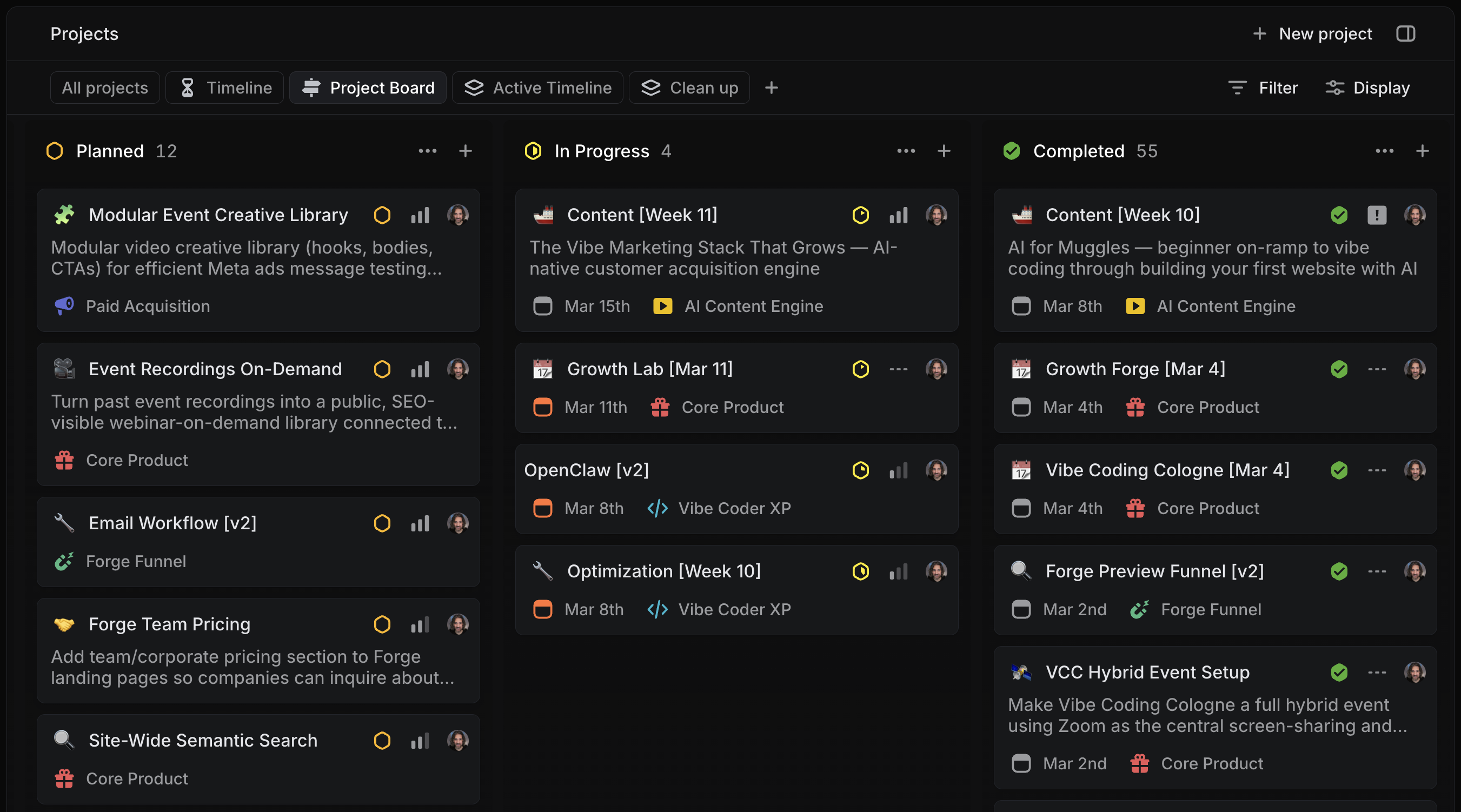
My Linear board — a mix of builder and marketing projects, planned, in progress, and completed. Entirely managed by Claude and ChristAIna with me.
Autonomous agents with mobile access
OpenClaw is a platform for building AI assistants that work autonomously — and that you can talk to via WhatsApp and Telegram. Think of it as giving your AI a schedule and a phone number. Our assistant ChristAIna checks in every hour: are there tasks due? New leads in the pipeline to follow up on? A campaign that finished overnight? Every morning, she sends a briefing — summarized campaign results, CRM updates, and a prioritized list of what needs attention today. She offers to handle what she can on her own: cleaning up stale deals, drafting follow-up messages, moving tasks forward.
When you're on the go, it works in reverse too. A quick voice note or chat message with an idea, and it goes straight into the system — turned into a task, a draft, or a research note. No context lost, no “I'll do it later” that never happens.
The combination: AI IDE for deep work, Linear for structure, OpenClaw for autonomous agents and mobile access. Everything connected, everything queryable by AI.
Cursor
AI IDE that connects to every tool in your stack via MCP servers. Where deep work happens – planning, creating, querying, orchestrating.
Claude Code
Anthropic's terminal-based AI agent. Powerful for autonomous multi-step tasks, code generation, and working across large codebases.
OpenClaw
Build autonomous AI assistants that run on a schedule, send briefings, manage your pipeline, and connect via WhatsApp and Telegram.
Linear
Project management with an excellent MCP server. The AI creates issues, updates statuses, and pulls context about upcoming work.
Notion for planning with its own MCP server. ChatGPT Projects for lighter planning. Anti-Gravity as an alternative AI IDE.
Content Marketing
Create once, distribute everywhere — the engine starts with something worth seeing.
Two cycles, one cascade.
Everything starts with planning. We run two content cycles: a monthly cycle around the big events — online and offline — that act as our primary lead magnets. And a weekly cycle for all blog, podcast, YouTube, and social content. Topics rotate through a handful of themes week by week, aligned with the event series. We detail the full rhythm in our Growth Codex lesson When we talk about it.
The weekly cascade works like this: start with an article that lays out the argument clearly. That becomes a long-form YouTube video which doubles as a podcast episode. On Monday, the article goes out as a newsletter. Then break it down into derivative posts — short-form videos, infographics, and slides. One piece of content becomes a full week of distribution.
AI guided by process skills
This is not “tell AI to write a blog post.” We have a multi-phase content creation process built into an AI skill — a structured set of instructions that guides the AI through every step, with approval gates in between. The AI never just runs off and produces output. It asks, proposes, challenges, and waits for a human decision before moving on.
The phases: first, pre-planning — the AI gathers context from the quarterly plan, past articles, poll results, industry news, and the content backlog. Then concept — defining the core idea (problem, insight, payoff), title, subtitle, and outline. Each gets challenged hard for specificity, stakes, and freshness before approval.
Then the most important step: the interview. The AI interviews me — pulling out personal stories, specific examples, failure modes, honest opinions on tools, and the texture that makes an article feel human. This is where the soul of the content comes from. Without the interview, it's just another AI article. With it, you get a founder's actual perspective backed by 15 years of growth marketing experience.
All of this lives in a planning document — the AI's source of truth. Execution gets tracked in Linear following the vibe management philosophy. The process is powered by Cursor with Claude, and it compounds: every week, the AI has more context — past articles, brand voice, what worked, what didn't — and the output quality keeps improving.
Weekly Content Workflow
Execute the Pirate Skills weekly content planning and publishing workflow. Guides the full cycle from pre-planning inputs through Captain's Insight publication and daily content cascade.
Weekly Content Workflow
One Captain's Insight per week, reinforced daily through a 7-day content cascade.
Cascade Principle
Work through phases sequentially. Do NOT jump ahead or plan everything upfront.
Each phase produces a specific output that feeds the next. Wait for user approval before moving on.
Phase 1: Pre-Planning     → Context gathered
Phase 2: Concept           → Core Idea approved → Title + Subtitle approved → Outline approved
Phase 3: Planning          → Ship Plan + Cascade map + Linear project + Interview
Phase 4: Production        → Article + Visuals + Video + Social copy
Phase 5: Publishing        → Monday drop + Daily cascade via GetLate.dev
State Tracking
Every planning doc tracks the current phase. When starting or resuming work, check the Current Phase field in the planning doc metadata and pick up where we left off.
| Current Phase | Phase 2: Concept – outline pending approval |
Linear mirrors state: The Content [Week N] project status reflects the overall phase. Individual issue statuses track daily content progress (Backlog → Todo → In Progress → Done).
When transitioning between phases, update both the planning doc and Linear.
Planning Document
Every week's content lives in a single planning doc:
docs/context/captains-insights/YYYY-wXX-short-title.md
This evolves from outline → drafts → final copy → published URLs.
Standard metadata:
## Metadata

| Field          | Value                                           |
| -------------- | ----------------------------------------------- |
| Current Phase  | Phase 1: Pre-Planning                           |
| Article URL    | /insights/{slug}                                |
| Publish Time   | Monday [Date], 08:30 Berlin (07:30 UTC)         |
| YouTube Video  | https://www.youtube.com/watch?v=...             |
| Spotify        | https://open.spotify.com/episode/...            |
| Apple Podcasts | https://podcasts.apple.com/...                  |
| Email Campaign | _TBD_ or campaign link                          |
Weekly Publishing Table
| Day | Format Type | Identity | CTA |
|---|---|---|---|
| Mon | Video | Captain's Insight Drop (article + video + podcast + email) | Start the Ship Plan / Choose Your Medium |
| Tue | Carousel | Deep Dive Carousel – one article section as 5-8 slides | RSVP next event |
| Wed | Video | Upcoming Events – promote next week's Lab/VCC/Forge | RSVP for next event |
| Thu | Image/PDF | Infographic – high-density information poster from the article | Read full article / Join community |
| Fri | Video | Cool Tool Moment (screen demo) OR Interview Episode | Watch full episode / RSVP VCC |
| Sat | Video | Podcast Highlight – audio clip over visual promoting the episode | Listen on Spotify / Apple |
| Sun | Image Gallery | Captain IRL – what's Ben up to? Candid, real life | Join community |
Every day has a distinct format. No two consecutive days share the same content type.
Workflow Phases
Execute phases in order. Load the relevant reference file when entering each phase.
Phase 1: Pre-Planning (Week N-1)
Read references/pre-planning.md.
Quick context gathering:
- Quarterly plan check – verify theme, title, event, CTA
- Calendar review – offline events, milestones
- Poll results – previous week's engagement patterns
- News scan – theme-aware industry developments
- Content backlog – review saved ideas
- Interview pipeline – check scheduled interviews
- Codex research – identify chapters for internal linking
→ Update planning doc Current Phase to Phase 2: Concept
Phase 2: Concept (Week N-1)
Read references/concept.md.
Guided conversation. Wait for approval at each gate.
- Core Idea – What's the problem, insight, and payoff? Challenge hard: specificity, stakes, freshness, actionability, cascade potential. Quarterly plan topics are inputs, not decisions. → APPROVAL GATE (this is the most important decision of the week)
- Title + Subtitle – Crystallize the idea into a value proposition → APPROVAL GATE
- Outline – 3-5 section headers with 1-sentence summaries → Tag carousel candidate + infographic brief → APPROVAL GATE
→ Update planning doc Current Phase to Phase 3: Planning
Phase 3: Planning (Week N-1)
Read references/planning.md.
Step-by-step with approval gates. Only the user can confirm completion or skip a step.
- Define Ship Plan – tangible artifact, proof test, definition of done → APPROVAL GATE
- Interview for depth – gather stories, texture, personal proof → APPROVAL GATE (must complete before cascade mapping)
- Cascade mapping – map article sections to daily posts → APPROVAL GATE
- Create Linear project –
Content [Week N]with all issues → APPROVAL GATE - Update event page – customize the related Lab/VCC/Forge event → APPROVAL GATE
→ Update planning doc Current Phase to Phase 4: Production
Phase 4: Production (Week N-1, parallel tracks)
Two reference files for this phase:
- references/article-drafting.md – Article craft
- references/production.md – Visuals, video, social copy
These run in parallel:
- Draft article – full Captain's Insight with all sections
- Create visuals – animated hero, static poster, transparent, infographic, carousel slides
- Record/edit video – horizontal Captain's Insight + vertical shorts
- Batch social copy – all weekly posts, platform-adapted
- Episode prep – YouTube description, thumbnail, podcast scheduling
→ Update planning doc Current Phase to Phase 5: Publishing
Phase 5: Publishing (Week N)
Read references/publishing.md.
Monday publication sequence:
- Podcast live at 08:00 Berlin (via Riverside)
- Article + YouTube + social at 08:30 Berlin (via GetLate.dev)
- WhatsApp announcement
- Update
insights.tswith podcast URLs - Email campaign
- Update planning doc with published URLs
Rest of week: Daily posts scheduled and published via GetLate.dev per the publishing table.
→ Update planning doc Current Phase to Complete
Key Conventions
publishedAt: ISO datetime with time (e.g.,2026-02-09T07:30:00Zfor 08:30 Berlin)- Link in Bio: Never put direct URLs in social posts. Exceptions: WhatsApp, email, YouTube descriptions
- Event URLs:
/pirate/lab/YYYY-MM-DD,/pirate/lab/YYYY-MM-DD,/grow/forge/{slug},/build/forge/{slug} - Internal links: Minimum 3-5 Codex references per article
- Image naming:
{slug}-animated.mp4,{slug}-cover.jpg,{slug}-transparent.png,{slug}-infographic.jpg
Related Skills
- pirate-story – Brand voice and content story framework
- captains-insights-interview – Interview-based insights
- linear-planning – Linear project management (Phase 3)
- ps-resend-email – Email campaigns (Phase 5)
- sync-podcast – Sync podcast links after publication
The article — your chance to inject some soul
The article is the source piece. Everything else in the cascade — video, podcast, newsletter, social posts — derives from it. That's why it gets the most attention. And this is where the difference between content and AI slop gets made.
The article is your opportunity to add depth, opinion, and soul. Your actual take on a topic. Your stories from the field. The nuance that only comes from having done the work yourself. AI can't generate that — it can only scale it. You inject the soul, the AI gives it wings. The interview process captures that soul. The AI then structures it, designs it, and distributes it across every format in the cascade. But the substance was always human.

You inject the soul, the AI gives it wings.
Each Captain's Insight article is a custom-built Next.js page. Not a Markdown file, not a CMS template. A fully designed, interactive web page with custom components, embedded tools, and visual elements tailored to the topic. This article you're reading right now? Built this way.
That gives us far more design freedom than MDX, WordPress, or Substack — but it also means the AI needs a consistent foundation to build on. Standardized article components and the weekly content skill handle that. The AI drafts the full article from the interview notes and approved outline, then we iterate together until the quality is right.
Image and video generation
Canva is the creative home base — brand kit, templates, past creatives, slide decks, ad designs all stored and organized in one place. When you need a social post, a carousel, or a static ad creative, Canva is the starting point.
For AI-generated images and video, we use Fal.ai — Nana Banana 2 for images, Veo 3.1 for image-to-video. Fal.ai is the best choice when your AI agent needs to create visuals programmatically. The results often get imported back into Canva for final touches, text overlays, and brand consistency.
ElevenLabs is worth mentioning here too — great for voice cloning, music and sound generation, and now also has integrated image and video generation in a studio environment that's easier to use than Fal.ai if you prefer a hands-on approach over agent automation.
Video recording and editing
Especially in B2B, you need to educate your audience. The best format for that is a talking head plus screen share video — think Loom, but production-grade. Riverside is actually a podcast platform that turns out to have fantastic AI-supported video editing. It handles talking head layouts, voice optimization, and automatic reformatting from 16:9 to square, 3:4, or 9:16 — while preserving the full quality of both camera and screen recording. It's become the fastest workflow for creating good explainer videos: record, let the AI cut and format, export in every aspect ratio you need.
Social media planning
GetLate is our social media planning tool. It has a great MCP server, allowing us to publish across more platforms than we'd ever consider reasonable. Our focus: LinkedIn and YouTube. Secondary channels — Instagram, Facebook, TikTok, Twitter/X, Pinterest, Threads, Bluesky — get near-identical content. More “see what happens” than optimized per platform.
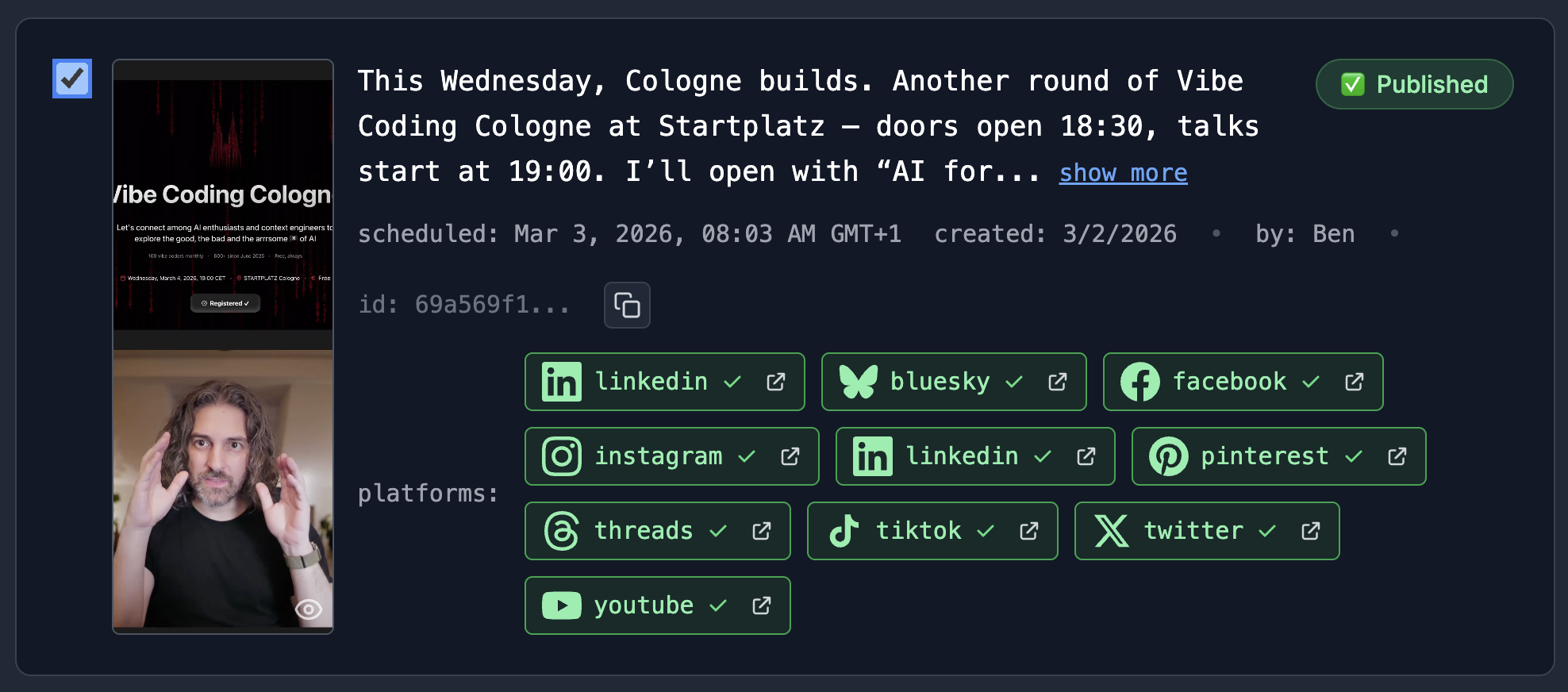
One post, ten platforms. GetLate publishes across LinkedIn, YouTube, Instagram, TikTok, Twitter/X, Bluesky, Pinterest, Threads, and Facebook — all scheduled by the AI via MCP.
Newsletter
The email newsletter goes out every Monday alongside the article via Resend, built on React Email — an open-source standard that lets us vibe-code professional email templates with light and dark mode support. Each newsletter contains an abbreviated version of the week's article with CTAs to read, watch, or listen — plus upcoming events and workshops.
The key principle:
Let the AI create, the human curate. AI excels at generating 12 variants; humans excel at instantly spotting the best one. Content creation is no longer the bottleneck — you can go from posting once a week to daily. The human contribution AI can't replace: taste, sense for what human users will prefer, and awareness of current trends.
Canva
Static designs, slides, and ad creatives. The fastest path from idea to visual – especially for non-designers.

Fal.ai
AI image and video generation via API. The best choice when your AI agent needs to create visuals programmatically.

Riverside
Video recording, editing, and podcast hosting in one. Surprisingly good editing tools for talking head content.

GetLate
Social media scheduling with an MCP server. Publish across more platforms than you'd ever consider reasonable.
ElevenLabs for voice cloning, music, and a hands-on studio for image/video. Buffer as an alternative social scheduler.
Ad Campaigns
Paid attention, measured precisely — from creative to conversion on your own terms.
Organic content rarely saturates the full pipeline. Most businesses need more traffic, more attention, more leads than inbound alone provides. If you share that problem — like most of us — ad campaigns are a solid solution.
Platform priority
Meta gets by far the most spend. Google comes second. LinkedIn becomes interesting if you're B2B with a high-price product. TikTok if you have a popular B2C product. But Meta + Google cover the basics for almost everyone. Our Growth Codex Traffic Channel Compass helps you pick the right channels for your business model.
Ad creatives: AI-generated, systematically tested
The bottleneck used to be creative production. Testing five different messages meant hiring a designer, waiting for drafts, giving feedback, waiting for revisions. Now you generate all five in an afternoon with AI image and video generation. Each angle gets its own creative — image and video — and goes into a structured campaign.
Autonomy
Speed
Community
Co-founder Gap
Automation
5 AI-generated video ads for Vibe Coding Cologne, each testing a different message angle. Generated with Fal.ai.
We cover the full workflow — from positioning to angle generation to AI creative production to campaign setup to conversion tracking — in our Message Testing with AI Creatives article. It includes real campaign data, benchmarks, and how to interpret results against your actual database — not just what the ad platform reports.
Events as the best lead magnet
Events have turned out to be by far the best lead magnet for most B2B businesses. I recommend doing at least one per month. We're now running: one offline event, two online free content-focused events, and one sales promotional info event per month.
The key strategy: record short video ads promoting your upcoming events, run them on Meta. Pair that with Canva-created static creatives. Optimize for lead conversion — a consented user registers for an event or submits any form on your website.
Benchmarks that work
As long as the cost per lead is acceptable and the lead quality works out — keep going. Very little direct sales promotion on ad platforms. Retargeting campaigns only for existing visitors and leads — small, consistent spend.
Honest status on AI campaign management:
We're currently experimenting with MCP servers for ad platform management, but I haven't found a satisfying solution yet for setting up campaigns entirely through an AI agent. We're getting there. I'll update this article when I can make a good recommendation.
Meta Ads
Gets by far the most spend. Best for B2C and broad B2B audiences. Events promoted via short video ads convert exceptionally well.
Google Ads
Captures intent – people actively searching for what you offer. Second priority after Meta for most businesses.
LinkedIn Ads for B2B with high-price products. TikTok Ads for popular B2C. Twitter/X, Pinterest, and Reddit for niche audiences.
Your Website
Your website isn't a brochure. It's your growth engine's home base.
After organic posts or paid ads, the website is where people land. And here's what kills most conversion rates: a single homepage trying to satisfy everyone. That's a safe way for high cost per leads and low conversion.
What you need is a very simple way to generate many specific landing pages — one per lead magnet, one per content piece. Our Growth Codex Landing Pages lesson covers the best practices. We create a dedicated landing page for every weekly Captain's Insight.
Our homepage — fully vibe-coded with Next.js and Cursor.
Next.js + your AI IDE = landing pages in minutes
We outlined the full setup in AI for Muggles with a step-by-step tutorial. Next.js is a stable, fast, reliable web framework — think of it as choosing WordPress or Webflow in the old days. The difference: you go into your AI IDE, talk to your model, and have specific landing pages, home pages, forms, quizzes created in minutes.
The more you invest in the infrastructure — landing pages that hit your tone, a defined visual style — the faster it gets. The AI takes all that context into account and you stop re-explaining. Skills reinforce the patterns further.
Next.js
Stable, fast, reliable framework – the vibe coding pick. Combined with your AI IDE, you get specific landing pages, forms, and quizzes in minutes.
Vercel
Deploy and host your Next.js site with zero config. Instant previews for every change, edge network for global speed, and built-in analytics.
Lovable for AI-native building without a full IDE. Webflow or Framer for design-focused no-code. WordPress for the largest ecosystem. Base44 for AI-native simplicity. Shopify for e-commerce.
Data & Identity
One database. One user. Every signal in one place.
Authentication as a growth lever
We use Clerk for authentication. Social media logins — Google, optionally LinkedIn, GitHub — alongside traditional name and email fields. About 50% of our users choose social login.
The marketing advantage: once someone is logged in, they don't hit another login wall for any other lead magnet. No redundant form fills. You already have their info — just give them free access. This dramatically lowers friction for the second, third, fourth conversion event.
Personalization through user history
Logged-in users accumulate history: events signed up for, content read, actions taken. You show them the next logical step:
None of this requires complicated systems. You tell the AI to make it so.
The database you can talk to
Pre-AI, messing with a database was too risky. I didn't dare touch the WordPress database. Even asking simple questions like “how many people signed up last week and where did they come from?” was beyond me.
Now it's trivial. Connect your AI IDE to your database via MCP — the Builder Codex Saving Data lesson walks through the setup. We use Supabase with the Supabase MCP. Give it read-only access to be safe, or read-write if you want the AI to also create and update entries. We use read-write — the AI created 84 events for the rest of the year in one conversation.
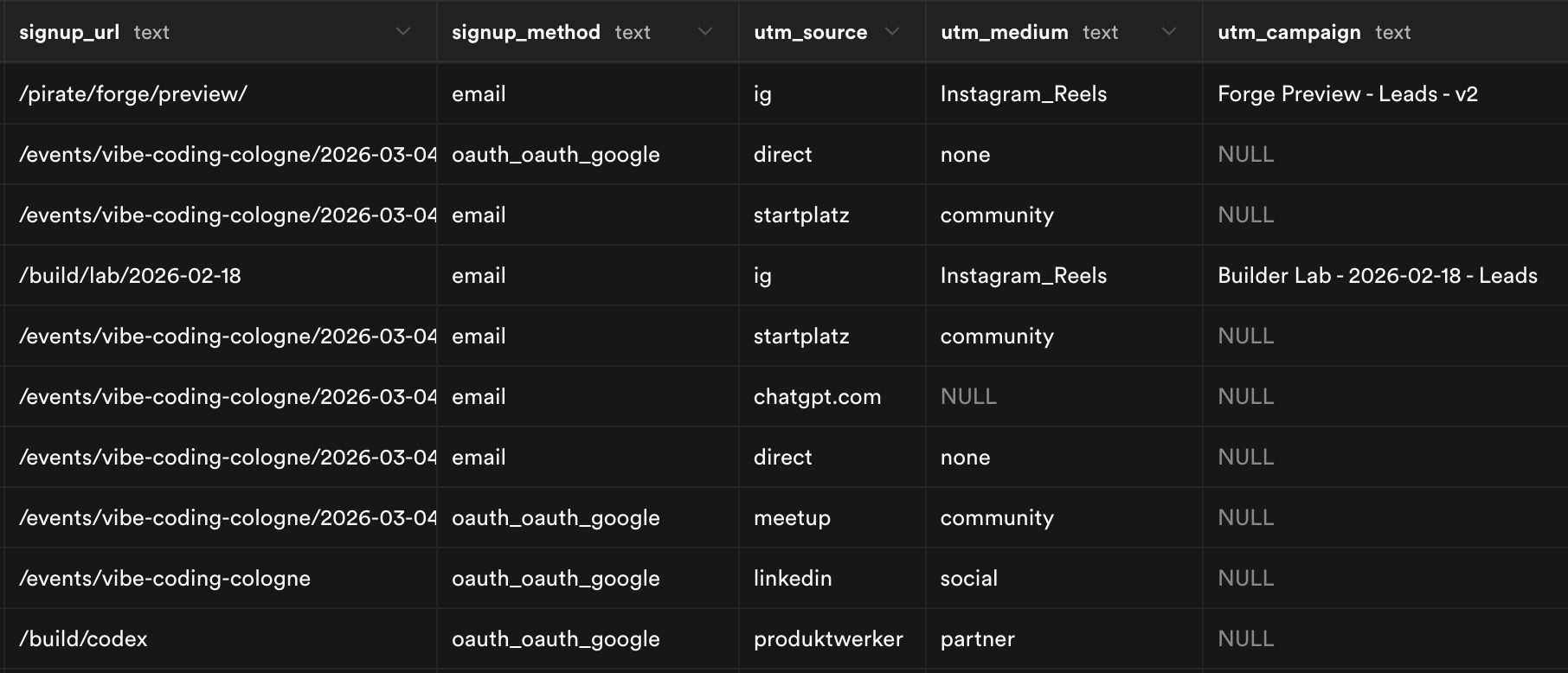
Every signup tracked — where they came from, how they signed up, which campaign brought them. All queryable by AI.
When someone signs up via Clerk, they also become a user in your Supabase database. Now you have a CRM you can talk to — enabling personalization and full attribution tracking. UTM parameters get saved at signup so you can later ask: “Which campaign brought the most users? Compare that to our ad spend.”
Supabase
Postgres database with an MCP server. Your single source of truth – the AI created 84 events in one conversation. Full CRM capabilities, attribution tracking, read-write access for agents.

Clerk
Authentication with social logins. Once logged in, users never hit another login wall. Dramatically lowers friction for repeat conversions.
Neon for serverless Postgres. Firebase for Google's all-in-one backend. Convex for reactive real-time data. BetterAuth or WorkOS for alternative auth providers.
Analytics & Optimization
Stop guessing. Let the data tell you what to fix next.
Two sources of truth. The database is the absolute source of truth. PostHog adds the detailed story — limited by user consent. About 60% of users consent to being tracked, which is more than enough to draw meaningful conclusions.
AI-managed analytics
PostHog has an MCP server, which means the AI can set up dashboards, define custom events — signup, login, purchase, quiz interaction, anything you want — configure A/B tests, and enable session recording. All managed by the AI agent. No manual technical setup.
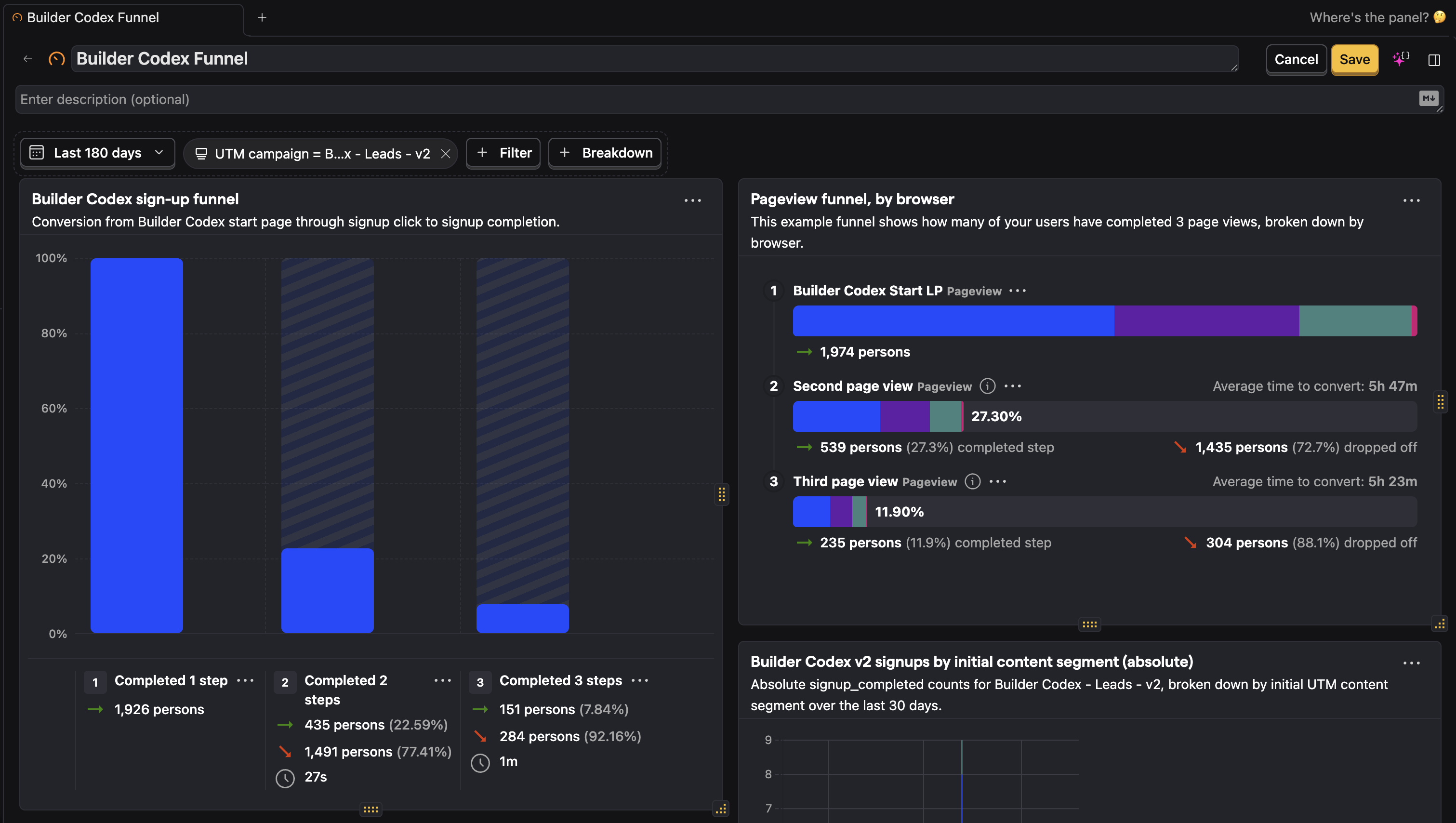
PostHog funnel analysis — sign-up conversion, pageview funnels, and attribution by campaign segment. All set up by the AI via MCP.
A/B testing
50% of visitors see version A, 50% see version B. Optimize for a metric like “percentage of page visitors who signed up.” Get clear indications over time of which messages and designs perform better. The Growth Codex Website Testing lesson covers the full methodology.
Session recording
Reconstructed user sessions showing exactly how people scroll and click through your website. Reveals form friction, areas where users spend disproportionate time, and clicks that distract from the main conversion path. Incredibly valuable for optimization.
Ad platform data can be integrated into PostHog. The free tier is generous — about 1M events per month — and the paid tier is very reasonable compared to alternatives like Google Analytics 360.
The feedback loop: measure → hypothesize → test → learn → iterate. This is the loop that makes the whole stack compound.
PostHog
Event tracking, A/B testing, session recording, and feature flags – all in one. MCP server lets the AI set up dashboards and custom events. Generous free tier (~1M events/month).
Google Analytics for free basics. Amplitude or Mixpanel for product analytics. Plausible for privacy-first lightweight tracking. Hotjar for heatmaps and session recording. Matomo for self-hosted control.
Message Sequences
Emails that write themselves, sequences that run themselves, tasks that handle themselves.
The goal: nurture leads through the customer lifecycle. Leads to qualified leads to opportunities to deals — or whichever stages make sense for your business. Our Growth Codex Messages lesson goes deeper on inbound and outbound strategy. Two systems run in parallel.
Weekly newsletter
Goes out every Monday. Contains an abbreviated version of the Captain's Insight article with CTAs to read, watch, or listen. Plus upcoming events and paid workshops like Growth Forge and Builder Forge. My recommended frequency: once a week (maximum), once a month (minimum). Increase frequency up to about 1% unsubscribe rate per email. Ours is at ~0.5%.
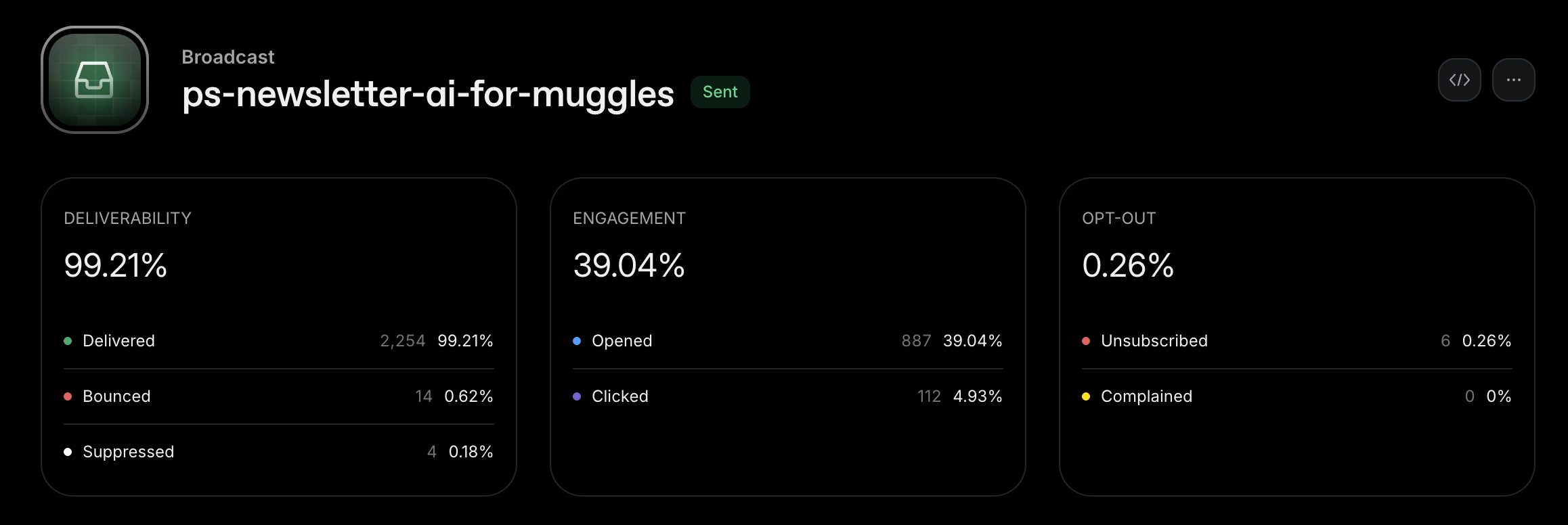
Last week's newsletter — 99% deliverability, 39% open rate, 0.26% opt-out. Sent via Resend.
Automated event sequences
Triggered by user actions. When someone signs up for an event, three emails fire automatically:
The 80/20 rule: about 80% value, 20% sales pitch. Always enough value to keep people engaged — without forgetting you're running a business.
Why Resend over legacy tools
I used to be on HubSpot, ActiveCampaign, Mailchimp. But I just can't vibe-code the emails in there. It's too slow, too unpersonalized. They don't look good enough. Resend builds on React Email — an open-source standard that lets me vibe-code professional emails with light and dark mode.
For sequence orchestration: Workflow DevKit. Tell the agent what messages to send, when, and to pick up fresh data in between — personalizing each email to the individual reader before sending. Previously used n8n, which is still solid. But the Workflow DevKit is native to the codebase. More effective, takes less time, and more personalized.
Resend
Email sending built on React Email – an open-source standard for vibe-coded templates. Light and dark mode, fully personalized, professional results.
Workflow DevKit
Durable sequence orchestration native to your codebase. Tell the agent what messages to send and when. Picks up fresh user data between steps for real personalization.
ConvertKit or Loops for managed newsletters. Substack for the simplest setup. n8n or Make for visual workflow automation.
CRM & Sales
Not every lead is ready. The best ones get your attention — automatically.
I'm a strong believer in self-checkout experiences. For products that don't require a demo call, the database works as your primary CRM and message sequences handle most lifecycle progression.
But as most B2B businesses know: self-service isn't enough. You need to become proactive about finding your best-fit customers — not only within your existing leads, but also outside. That's where a dedicated CRM layer comes on top.
Lightweight CRM: Attio
Legacy CRMs — HubSpot, ActiveCampaign, Intercom — feel very heavy for a small but mighty team. Good for larger teams with a strong sales focus, but overkill for B2B SaaS that isn't pure enterprise sales.
Attio is lightweight and has a great MCP server. I have it connected to both my Claude Opus agent and an OpenAI assistant that does a daily pipeline review: nudges me toward pushing deals forward, cleans up stale deals, keeps CRM data current.
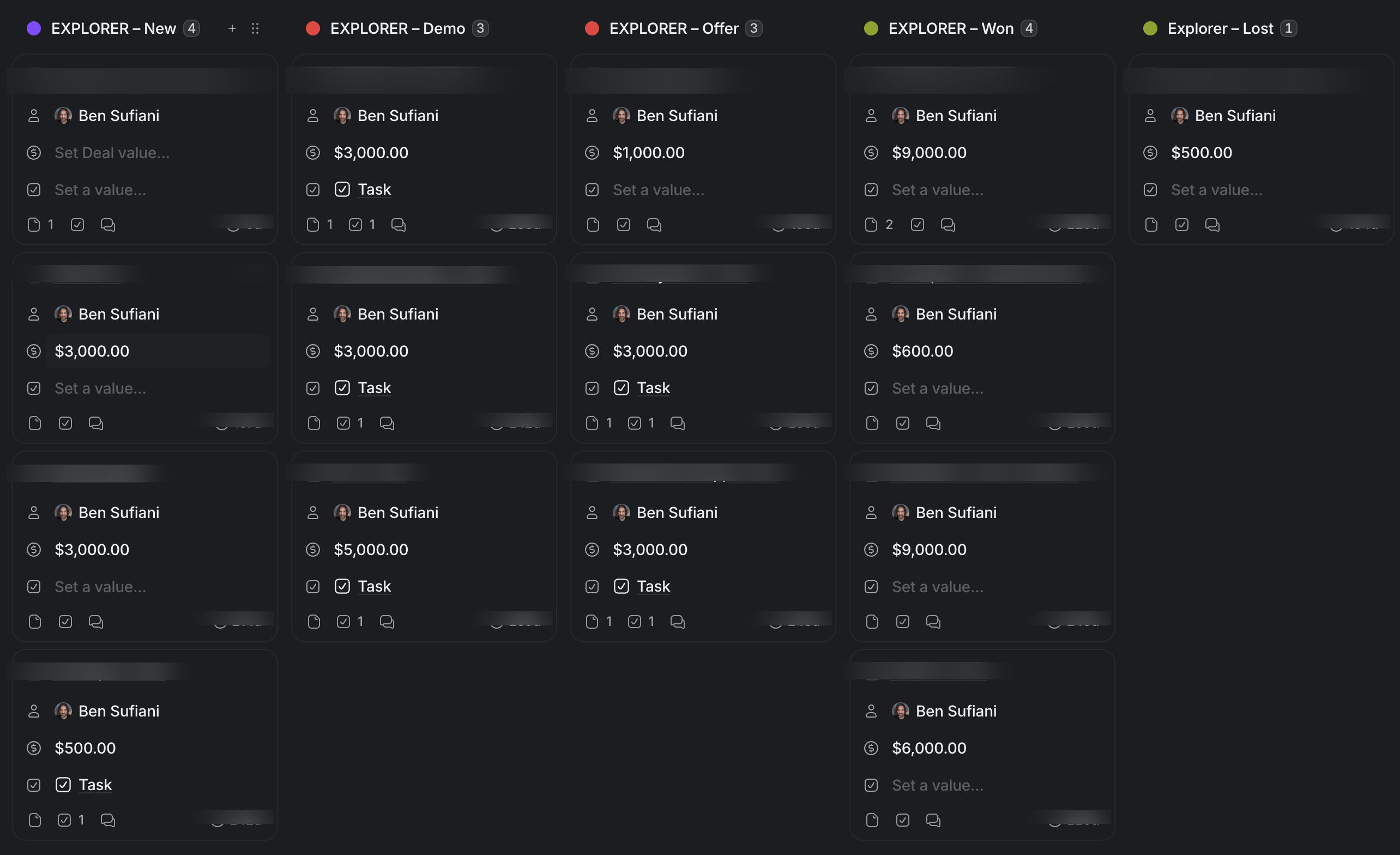
My Attio deal pipeline — New, Demo, Offer, Won, Lost. AI reviews this daily and nudges deals forward.
Hunt the diamonds
The CRM surfaces the best-fit leads — people who can afford accelerated progress through more direct work beyond the workshops, in our CaptAIn on Deck one-on-one format. This roughly doubles our monthly revenue.
Automated sequences handle the bulk. The CRM surfaces who needs personal attention. A daily AI-assisted pipeline review keeps the data clean and deals moving. The Growth Codex CRM Workflows lesson covers how to organize this in practice.

Attio
Lightweight CRM with a great MCP server. Connected to AI agents for daily pipeline review, deal nudging, and keeping data current. Built for small but mighty teams.
HubSpot for larger teams with dedicated sales. Pipedrive for pure pipeline focus. Notion CRM for a DIY approach. Lime CRM, Brevo, or Instantly for outreach-heavy workflows.
Vibe Marketing
Stack Picker
Don't set up all 8 layers at once. Pick the tools that fit your situation, discuss your stack with AI, then activate one layer — the one closest to revenue.
Planning & Orchestration
Your central hub – AI IDE, task management, and mobile access to dump ideas and get work started.
Content Marketing
Planning, creation, and distribution of blog, video, podcast, and social content.
Ad Campaigns
Paid acquisition across platforms – creatives, targeting, and optimization.
Website
Your growth engine's home base – landing pages, lead capture, and personalization.
Data & Identity
One database, one user – authentication, personalization, and attribution.
Analytics & Optimization
Event tracking, A/B testing, session recording, and the feedback loop.
Message Sequences
Newsletter, automated sequences, and lifecycle email orchestration.
CRM & Sales
Pipeline management, lead scoring, and proactive outreach for best-fit customers.
Your Marketing Stack
Select tools above to build your stack
Scroll through each layer and pick the tools that fit your business. Your complete marketing stack will appear here.
Ready to Go Deeper?
Don't miss the next Insight
Join the crew and get fresh perspectives delivered weekly.
Free account. No spam. Unsubscribe anytime.
Questions & Answers
Do I need all 8 layers from day one?
How much does this stack cost to run?
What if I'm not technical enough for Next.js and Supabase?
Can I use different tools than the ones you recommend?
How is this different from the Calm Builder Funnel article?
What about agencies? Shouldn't I just hire someone?

Founder from Cologne with 15 years of startup experience across 9 ventures. After helping thousands master growth marketing, Ben learned vibe coding from scratch and launched CaptAIn within three months. He leads the Vibe Coding Cologne community, blending real founder experience with teaching clarity.