
CRM Workflows
Build a systematic approach to managing your customer journey in your CRM, creating automated workflows that nurture leads, track engagement, and seamlessly integrate marketing and sales.
1. Goal - Organizing your customer journey in one place
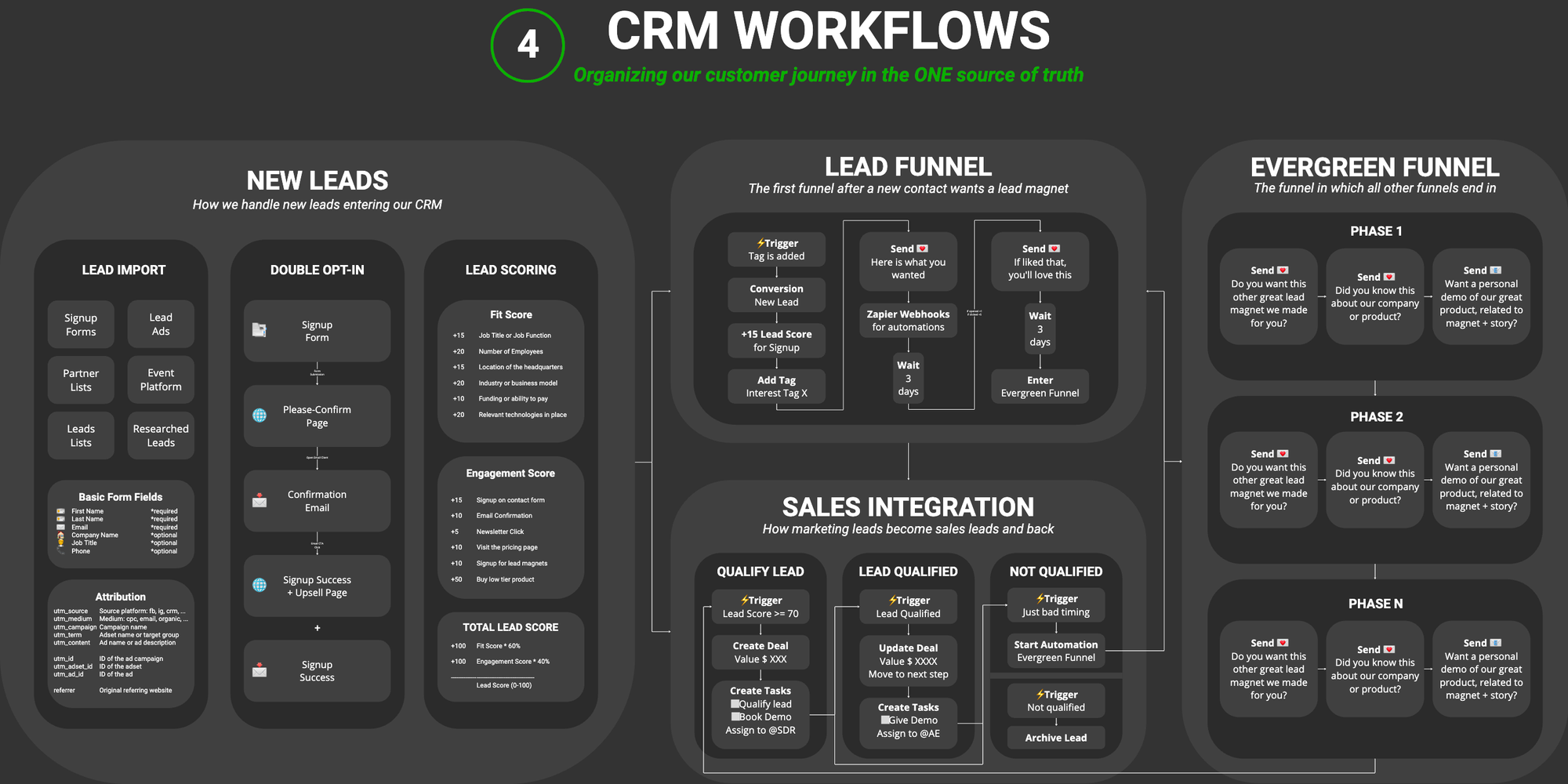
Where You're Building From
You've built your funnel strategy, created landing pages, and crafted message sequences. Now you need a central system to manage it all. Your CRM (Customer Relationship Management system) is your single source of truth – the command center where every lead, contact, and customer interaction is tracked, automated, and optimized.
What You're Deciding Here
This lesson helps you choose the right CRM for your needs and set up the essential workflows that bring your funnel to life. You'll decide which CRM platform fits your business model, technical comfort, and budget – then build the automated systems that handle new leads, nurture sequences, evergreen engagement, and sales handoffs.
What Should You Focus On First?
Your starting point depends on your current situation and business model:
For Technical Founders and Vibe Coders If you're comfortable with APIs and custom integrations:
- Attio: Modern, flexible CRM built for technical teams with powerful API
- n8n (self-hosted workflows): Full control, integrate anything
- Supabase + custom workflows: Build exactly what you need
- Focus on: Custom automations + API integrations + data flexibility
For Beginners or Solo Founders Start with simple, affordable CRMs that handle the basics well:
- HubSpot (free tier available): Best for inbound marketing, great free tools
- Mailchimp (if already using for email): Simple CRM built into email platform
- Focus on: New lead tracking + one lead magnet funnel + basic engagement
For Growing B2B SaaS or Service Businesses Invest in CRMs with strong automation and sales features:
- HubSpot (paid tiers): Comprehensive marketing + sales tools
- ActiveCampaign: Powerful automation at mid-tier pricing
- Pipedrive: Strong sales focus with good marketing integrations
- Focus on: Lead scoring + sales integration + deal management
For High-Touch Sales Models Prioritize CRMs with strong deal management and team collaboration:
- HubSpot (Sales Hub): Excellent pipeline management
- Pipedrive: Built specifically for sales teams
- Attio: Flexible for custom sales processes
- Focus on: Deal stages + task automation + team collaboration
Outcome: You've selected your CRM and know which workflows to build first.
2. New Lead Tracking
The Importance of Capturing Every Lead
The foundation of an effective CRM is getting every single lead into it. Leads can come from many different places, and your job is to ensure none fall through the cracks.
Where Leads Come From
Think about all the places where potential customers express interest:
Website Interactions:
- Lead magnet downloads (guides, templates, webinars)
- Free trial signups
- Contact form submissions
- Newsletter subscriptions
- Pricing page inquiries
Social Media Platforms:
- LinkedIn connection requests or messages
- Instagram or Facebook DMs
- Twitter/X replies or DMs
- Comments on your posts
Messaging Apps:
- WhatsApp conversations
- Telegram messages
- Slack community joins
Events & Networking:
- Event hosting platforms (Eventbrite, Luma, Lu.ma)
- Conference or meetup attendees
- Webinar registrants and attendees
- Workshop participants
Direct Outreach:
- Email replies to your outreach
- Referrals from existing customers
- Partnership inquiries
Getting Leads Into Your CRM
For each lead source, you have three options:
1. Native Integrations (Best Option) Most CRMs offer direct integrations with popular tools:
- Website forms → CRM (via native form builder or API)
- Email tool → CRM (ConvertKit, Mailchimp integrations)
- Event platforms → CRM (Eventbrite, Luma integrations)
2. Manual Entry (Short-Term Solution) For sources without integrations, manually add leads:
- Copy contact info from LinkedIn, WhatsApp, etc.
- Add to CRM with proper source tagging
- Works when lead volume is low (under 10 per day)
3. Automation Tools (For Custom Needs) Use tools like n8n to create custom workflows:
- Connect any platform to your CRM
- Automate data transfer and tagging
- Handle complex routing logic
Initial Contact Setup
When a new lead enters your CRM:
- Tag them with their source (LinkedIn, website form, Eventbrite, etc.)
- Tag them with their initial interest (which lead magnet, which product)
- Add them to the appropriate funnel (lead magnet sequence, sales outreach)
- Start tracking their engagement (opens, clicks, replies)
Outcome: You have a complete plan for capturing all leads from every source into your CRM.
3. Lead Magnet Funnels
Implementing Your Email Sequences as CRM Workflows
In the Messages lesson, you created complete ToFu (awareness) email sequences for your lead magnets. Now it's time to implement those sequences as automated workflows in your CRM.
What You're Building
You're not creating new email content – you're taking the sequences you already created and setting them up as automated workflows that trigger when someone downloads a lead magnet.
How CRM Workflows Work
Most modern CRMs (Attio, HubSpot, ActiveCampaign, Pipedrive) support workflow automation:
- Trigger: Lead downloads specific resource or submits form
- Action 1 (Immediate): Send lead magnet with warm welcome email
- Action 2 (Day 1): Send check-in email
- Action 3 (Day 3): Send additional resource email
- Action 4 (Day 5): Send soft offer introduction
- Action 5 (Day 7): Send case study or success story
- Completion: Move to Evergreen Funnel workflow
If Your CRM Doesn't Support Workflows
Some simpler CRMs (like basic Mailchimp) don't have advanced workflow features. In that case, you can:
- Use your email marketing tool's automation features (most have this)
- Use a service like n8n to orchestrate the workflows
- Manually manage sequences (only viable for very low volume)
Interest Tracking and Tagging
As leads engage with different lead magnets, track their interests:
- Tag leads based on which lead magnet they downloaded
- Track email opens and clicks to measure engagement
- Use tags to segment future communication
- Identify patterns (someone interested in "content" + "storytelling" shows clear intent)
Outcome: You have CRM workflows configured that automatically send your lead magnet sequences.
4. Evergreen Engagement System
The Concept of the Evergreen Funnel
The Evergreen Funnel is your always-on engagement system. After leads complete their initial lead magnet funnel, they don't disappear – they enter the Evergreen Funnel where you continue building the relationship over time.
Modular Email Sequences
Structure your Evergreen Funnel in modular phases:
Phase 1: Education (Weeks 1-4)
- Deep-dive content on core topics
- Address common misconceptions
- Build authority and trust
- All giving, no asking
Phase 2: Consideration (Weeks 5-8)
- Introduce your methodology or framework
- Share customer success stories
- Compare approaches (yours vs. alternatives)
- Soft introduce your offerings
Phase 3: Conversion (Weeks 9-12)
- Present your core offering
- Address objections directly
- Offer limited-time bonuses or pricing
- Clear call-to-action to purchase or book call
Phase 4: Engagement (Ongoing)
- Mix of educational content and offers
- Community highlights
- Product updates
- Seasonal or timely content
The Give, Give, Give, Ask Methodology
Balance your communication ratio. For every sales-focused email (ask), send 2-3 value-focused emails (give). This maintains goodwill and keeps your audience engaged rather than feeling sold to constantly.
Modular Flexibility
Using a modular approach makes optimization easier:
- If certain emails aren't performing, move them later in the sequence
- If an email generates great engagement, move it earlier
- Replace underperforming content without rebuilding the entire funnel
- A/B test individual modules to improve overall performance
Outcome: You have a complete evergreen engagement system configured in your CRM.
5. Sales Integration
The Marketing-Sales Handoff
Sales integration is the mechanism through which marketing leads are evaluated and shifted along the path toward becoming sales leads – and potentially back to marketing when timing isn't right or the fit isn't there.
Engagement Scoring
Implement a scoring system that increases as leads interact with your content:
- Downloaded lead magnet: +5 points
- Opened emails (each): +1 point
- Clicked email links (each): +3 points
- Visited pricing page: +10 points
- Attended webinar: +15 points
- Requested demo: +25 points
When a lead's score surpasses your threshold (e.g., 70 points), trigger the qualification process.
Creating Deals in Your CRM
Once qualified, create a "deal" in your CRM. Deals differ from contacts – they represent a specific business opportunity with:
- Associated contact information
- Deal value (expected revenue)
- Deal stage (qualification, demo, proposal, negotiation)
- Expected close date
- Assigned sales rep
The Sales Process Flow
Qualified → Demo Scheduled → Demo Completed → Won or Not Qualified
If won: Move to onboarding and customer success workflows
If not qualified, two scenarios:
- Bad Timing: Lead returns to Evergreen Funnel for continued nurturing
- Bad Fit: Lead is archived or marked as not a match
This creates a complete loop: landing pages → nurture sequences → qualification → sales → closed or back to nurturing.
Outcome: You have lead scoring and sales integration fully configured in your CRM.
6. Your CRM Workflows Documentation
Creating Your Complete CRM Documentation
You've configured lead tracking, lead magnet funnels, evergreen engagement, and sales integration. Now it's time to consolidate all of this into one comprehensive documentation file – your CRM Workflows Master Document.
What This Documentation Includes
Your CRM Workflows documentation will extract and organize:
- All workflow configurations and automation rules
- Lead scoring models and qualification criteria
- Deal stages and sales process flows
- Integration points between systems
- Testing procedures and optimization plans
Why This Matters
With this master documentation, you can:
- Onboard team members quickly with complete CRM setup reference
- Replicate workflows if you switch CRMs or add new tools
- Troubleshoot issues by referring to documented logic
- Optimize specific workflows without affecting others
- Maintain consistency as your team grows
The Goal: Your CRM Command Center
Next time you need to update a workflow, add a new lead magnet, or train someone:
- Open your CRM Workflows documentation
- Find the relevant workflow configuration
- Make informed changes with full context
- Document updates for future reference
Outcome: You have a complete CRM Workflows master document consolidating all configurations.