
Meet Jarvis,
My Vibe Manager
The AI workflow that keeps me sane, organized, and productive as a founder. The exact setup with Context + Cursor + Linear MCP.
The Weirdest Thing That Happened
to My Productivity
I'm not a developer. I'm a growth marketer who discovered vibe coding a year ago and taught myself to build products with AI. Along the way, something unexpected happened: I moved my business strategy into my codebase.
Not my product code – my actual business context. Strategy, OKRs, quarterly goals, bottlenecks, content plans. All of it. Markdown files in a folder called docs/context/.
This sounds insane. I know. Your business plan doesn't belong next to your React components. It belongs in Notion or Asana or some sensible project management tool.
Except those tools are still plain stupid compared to what vibe coders have gotten used to.
In Cursor – my code editor that happens to be an AI operating environment – the AI can read and edit any file. It can write plans, cross-reference my OKRs with my calendar, draft content based on my positioning, and remember everything without me explaining it again.
Once you've experienced that, you never go back to re-explaining your business to a chatbot.
The docs/context/ folder became my business brain – written by AI in collaboration with me, evolving over time. It holds my strategy, my quarterly OKRs, the bottlenecks I'm trying to break, my content pipeline, my product positioning. All in markdown, all AI-readable, all connected.
But I quickly ran into a wall. Organizing everything in text files worked for context. It didn't work for execution. I missed the visual Kanban board I'd gotten used to from Trello and Asana – the familiar stages from Ideas to Planning to In Progress to Done. The bird's eye view a text file can't give you.
That's when I discovered what I now call vibe management.
How do you currently organize your work as a founder or builder?
Three Layers of
Vibe Management
The system isn't one tool. It's three layers that compound – each one solving a different problem, together creating something that feels like having a project manager who actually gets it.
Layer 1: The Context Brain
A docs/context/ folder in your codebase with markdown files: strategy, OKRs, bottlenecks, content plans, positioning.
This isn't documentation. It's the memory your AI assistant reads before every conversation. When you say "plan next week's content," it already knows your quarterly theme, your target audience, your upcoming events, and the bottleneck you're trying to break. No re-explaining. Ever.
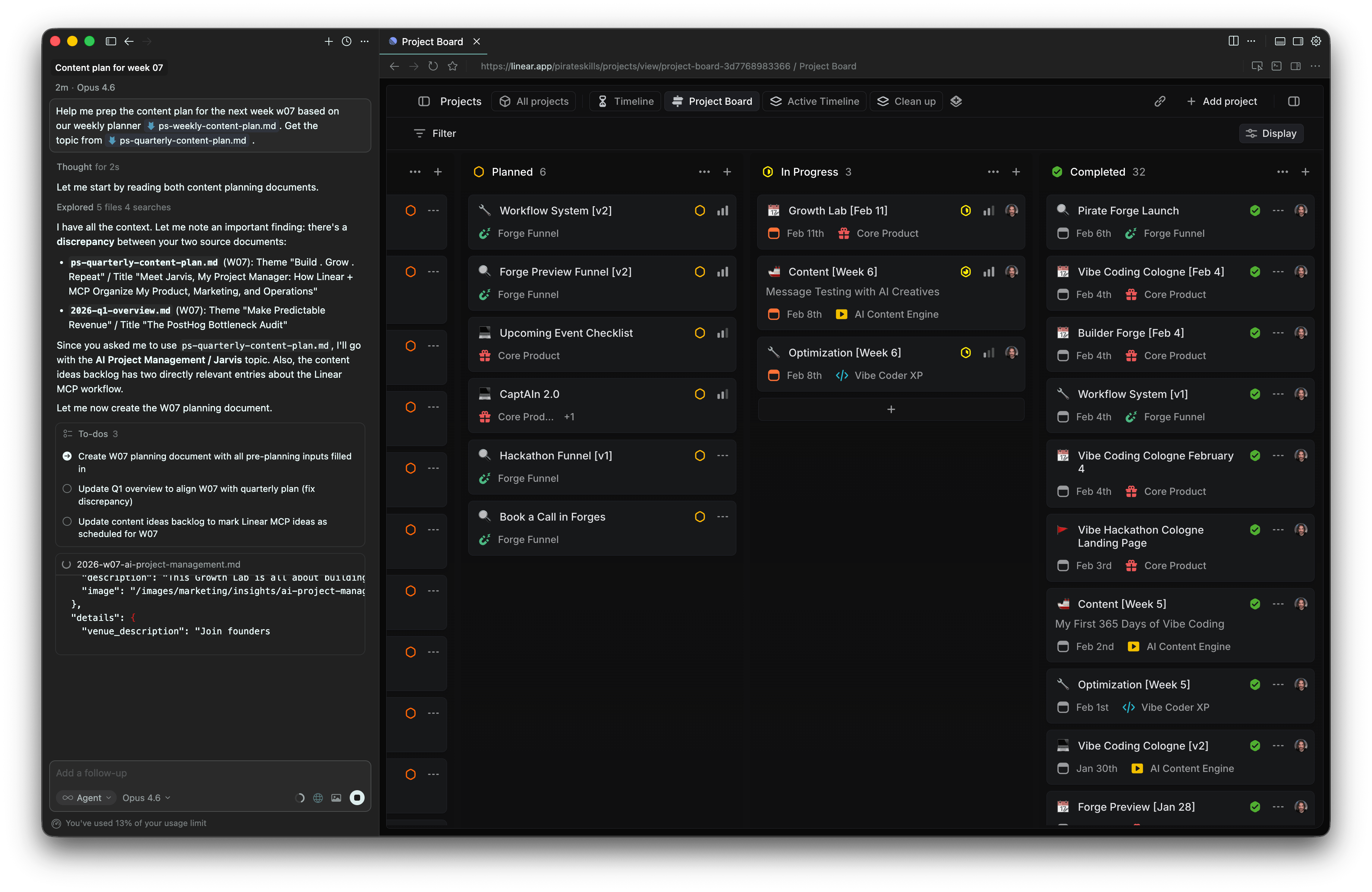
Layer 2: Cursor as Business Cockpit
A code editor that doubles as your AI operating environment. Point it at context files, access MCP servers (your database, Stripe, Linear, Notion), write code when you need it, draft newsletters to specific audience segments – things you would never have had time for before.
I use Wispr Flow for voice input – talking instead of typing. Brain dump everything on your mind, and the AI structures it into actionable issues. It's faster and more natural than any keyboard workflow.
And it compounds. Every correction you make becomes a rule or skill the AI remembers. Every friction point you encounter gets smoothed out. The system gets smarter about you over time.
Layer 3: Linear via MCP
The visual execution board your codebase can't provide. Linear gives you the Kanban view – Ideas, Planning, In Progress, Done. The stages that let you see at a glance where everything stands.
The magic: through Linear's MCP, your AI can read projects, create issues, set priorities, estimate effort, organize sprints – all through natural conversation. You talk. The board updates. That's vibe management.
Why this combination works:
"I tried Notion first – great for docs, but AI couldn't do anything with it. Then I moved everything into the codebase – context worked beautifully, but managing tasks in text files was miserable. Then I found my system: context where the AI is smartest, execution where I need visibility. Three tools, one workflow. It took me months of wrong turns to land here."
Why This Is Therapeutic
"Therapeutic" isn't a word you expect about project management. But it's the most honest word I have for what this feels like.
As a founder, my stress level is usually high. There's always more to do than time allows. Ideas scatter across tools, notes, and mental to-do lists. You go to bed wondering what you forgot. You wake up already behind.
Vibe management changed that. Not by reducing the work – but by giving me a weekly rhythm that made the work feel manageable.
The sprint cycle is the heartbeat. Every Monday, I plan the week – brain dump everything, let the AI create and estimate issues, commit to what fits. During the week, issues move across the board: Backlog to In Progress to Done. Every day I can see exactly where I stand.
That progression is what makes it therapeutic. Not just a to-do list that grows – a board that visibly moves. You finish something, it moves. You start the next thing, it moves. By Friday, you can look back and see a week of real progress – not a vague feeling of "I was busy," but actual evidence of what got done.
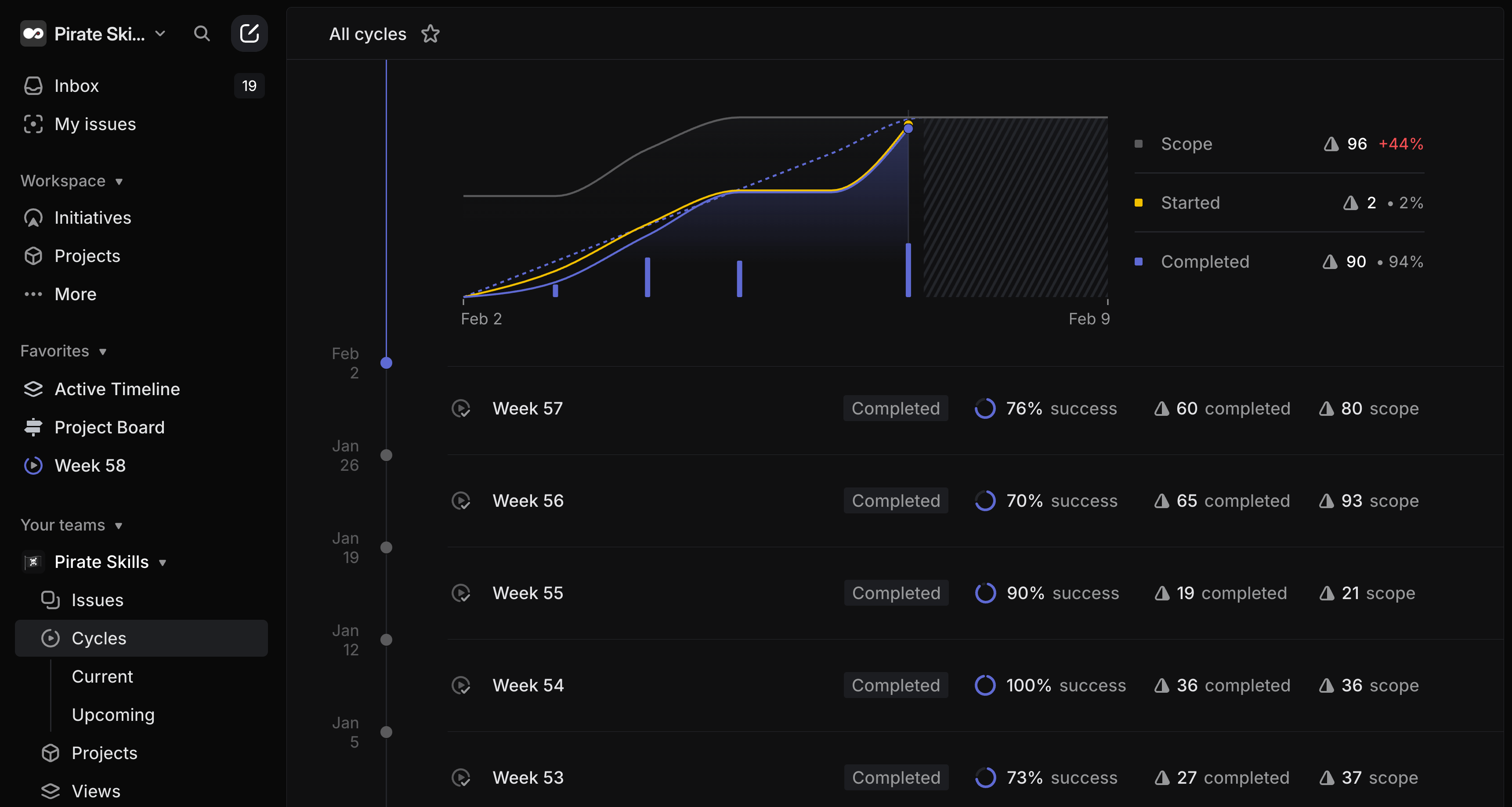
Monday: plan the sprint. Brain dump everything, let the AI estimate effort, commit to what fits the week.
Every day: see what's next. No decision fatigue – the sprint tells you what to work on. The AI helps you execute it.
Friday: see what you've done. Not guessing – seeing. Issues in Done, velocity building week over week, progress you can actually appreciate.
Sunday: close the loop. Review what shipped, carry over what didn't, start the next week with a clean slate and a clear plan.
What this actually feels like:
"This must be close to what Tony Stark feels like talking to Jarvis. You speak, and the system just gets it – your goals, your constraints, what you did yesterday, what matters most today. And then it doesn't just organize your work – it helps you do the work. Need a landing page? It knows your positioning. Need a newsletter for a specific audience segment? It knows who attended which events. The same AI that planned the sprint helps you execute every task in it. I know how that sounds. But once you've experienced it, there's no going back."
"But Will AI Just Tell Me
What I Want to Hear?"
This is the question I get most – and the one I take most seriously.
If your AI project manager agrees with everything you say, you've just automated confirmation bias. That's not a Jarvis – that's a mirror.
I'm fully aware of the sycophancy risk. I still feel 100% responsible for every outcome. But I've learned something important: if you ask the right questions, you can get very meaningful pushback.
The OKR Audit
I asked the AI to compare what I actually worked on in January and February against the OKRs I set at the beginning of Q1 2026. The context files had everything – my stated goals, my planned priorities, and through Linear, exactly what I actually spent time on.
It didn't catch everything. But it pushed back on important things:
"Your KR2 target is 50 paid users by end of Q1, but you've spent most of January on content infrastructure rather than conversion optimization. At current trajectory, you'll need significant acceleration in February and March to hit this."
– Claude Opus 4.6, comparing Linear activity against pirate-skills-okrs-q1-2026.md
"The Growth Forge cohort launch is listed as a Q1 priority, but I see no project or issues for it in Linear yet. If the target date is mid-February, planning should start this week."
– Claude Opus 4.6, flagging a gap between stated priorities and actual execution
"You've completed 85% of content-related issues but only 30% of product development issues. Your OKRs weight product and growth equally – is this imbalance intentional, or are you defaulting to what feels comfortable?"
– Claude Opus 4.6, calling out the gap between what I said mattered and where I was spending time
None of this was prompted by "tell me what's wrong." It came from a specific question: "Where am I kidding myself about my Q1 priorities?"
That's the trick. "Does this plan make sense?" will always get a yes. Asking the AI to compare your stated goals against your actual behavior – with the data right there in Linear and the context files – gets something useful.
The AI is the advisor. You are the captain. You decide whether to adjust the plan, correct your behavior, or accept the current path. But at least now you're making that decision with data, not delusion.
The Future of Work
Is a Conversation
I believe the workflow I'm describing here isn't just a personal productivity hack. It's a preview of how we'll all co-work with AI.
The pattern is simple: you break a project down, decide the direction, and then AI agents execute the tasks. At critical points where a human needs to be in the loop, they present you with a solution, give you options, and continue from your decision.
This has already started. AI agents are becoming users in the same tools we use. You can assign any Linear issue directly to Cursor, or mention it in a comment – and a cloud agent gets to work. It reads the context, pulls in the relevant details, implements a solution, and opens a pull request. It can work across multiple issues simultaneously, all before you've even opened the task yourself.
That's the shift. Agents aren't chat windows you paste problems into. They're teammates. They show up in your project board, your assignee dropdown, your comment thread – right next to you.
Article is done. Next up is the newsletter for Monday morning.
Can you take a stab at this @Cursor|
Users
 CursorAgent
 BenHuman
Think about that. You plan a sprint on Monday morning. By Monday afternoon, agents have already started working through the backlog. You review their solutions, accept or redirect, and move on. The tasks that need your judgment get your full attention. Everything else just gets done.
The captain sets the course. The crew executes. You intervene where it matters.
We're not there fully yet. But the gap between planning and execution is collapsing fast. What used to take a team of five and weeks of coordination is becoming one founder with context files, an AI that remembers everything, and a board full of agents ready to work.
The founders who set up this system now – who learn to organize context for AI, who build the habit of structured sprints, who develop the skill of directing agents – will have an enormous advantage as these tools get better. And they're getting better every month.
Cheers,
Ben
Build Your Own Jarvis
in 5 Steps
You've seen the system. Now it's your turn. These 5 steps walk you through the full setup – from installing the tools to running your first honest audit. No coding required.
By the end, you'll have an AI that knows your business, a project board it can manage through conversation, and the habit of asking the hard questions about your priorities.
Ready to Go Deeper?
Don't miss the next Insight
Join the crew and get fresh perspectives delivered weekly.
Free account. No spam. Unsubscribe anytime.
Questions & Answers
Do I need to use Linear specifically?
What if I'm not technical and don't use a code editor?
How much time does maintaining the context files take?
What should go in the context folder vs. Linear?
Won't the context files get out of date?
How do I handle urgent tasks that disrupt the sprint?
What if I'm a team of one – isn't this overkill?
Can I use this for client work or consulting?
What about personal tasks?

Founder from Cologne with 15 years of startup experience across 9 ventures. After helping thousands master growth marketing, Ben learned vibe coding from scratch and launched CaptAIn within three months. He leads the Vibe Coding Cologne community, blending real founder experience with teaching clarity.