
The Agent-Ready Website
for the Rest of Us
Agents now find events, answer questions and book seats for the people who send them. Watch one do it on pirateskills.com – then make your own site just as easy for them.
Ask Your Agent
What’s On
More and more people don’t visit a website anymore. They ask ChatGPT, Claude or an agent to do it for them. Most websites turn that agent away. Ours did too, until recently.
Here is what it looks like when a website is ready. I asked Claude:
Set up once
- 1Customize → Connectors → + → Add custom connector
- 2Paste pirateskills.com/mcp and click Add
- 3In a chat: + → Connectors → switch Pirate Skills on
Use the Pirate Skills connector: what events are coming up at Pirate Skills?
Pirate Skills · list_events
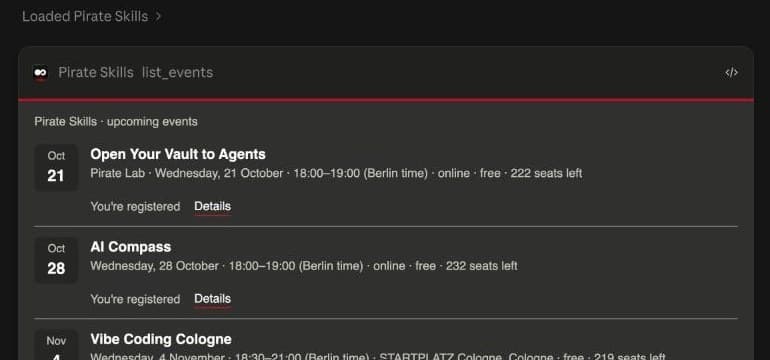
No search, no website, no form. A card with the dates and the seats left, right inside the chat. Once you’re signed in, each event you haven’t booked gets a Register button, and one click books the seat. That click is always yours.
This works for any website, not just ours. Below you’ll see the same thing in four other places, what makes it work, how we checked it, and where to start on your own site. I’m not a developer, and you don’t need to be one either.
Wherever Your
Customers Are
People use different tools. So the same question gets the same answer in each of them. Pick one:
For people who live in ChatGPT.
Set up once
- 1Settings → Plugins → MCPs → Add → Add MCP server
- 2Name it pirateskills, choose Streamable HTTP, paste pirateskills.com/mcp, save
- 3Start a chat in Work
Use the pirateskills connector: what's on at Pirate Skills next week?
Pirate Skills · list_events · 4 seconds
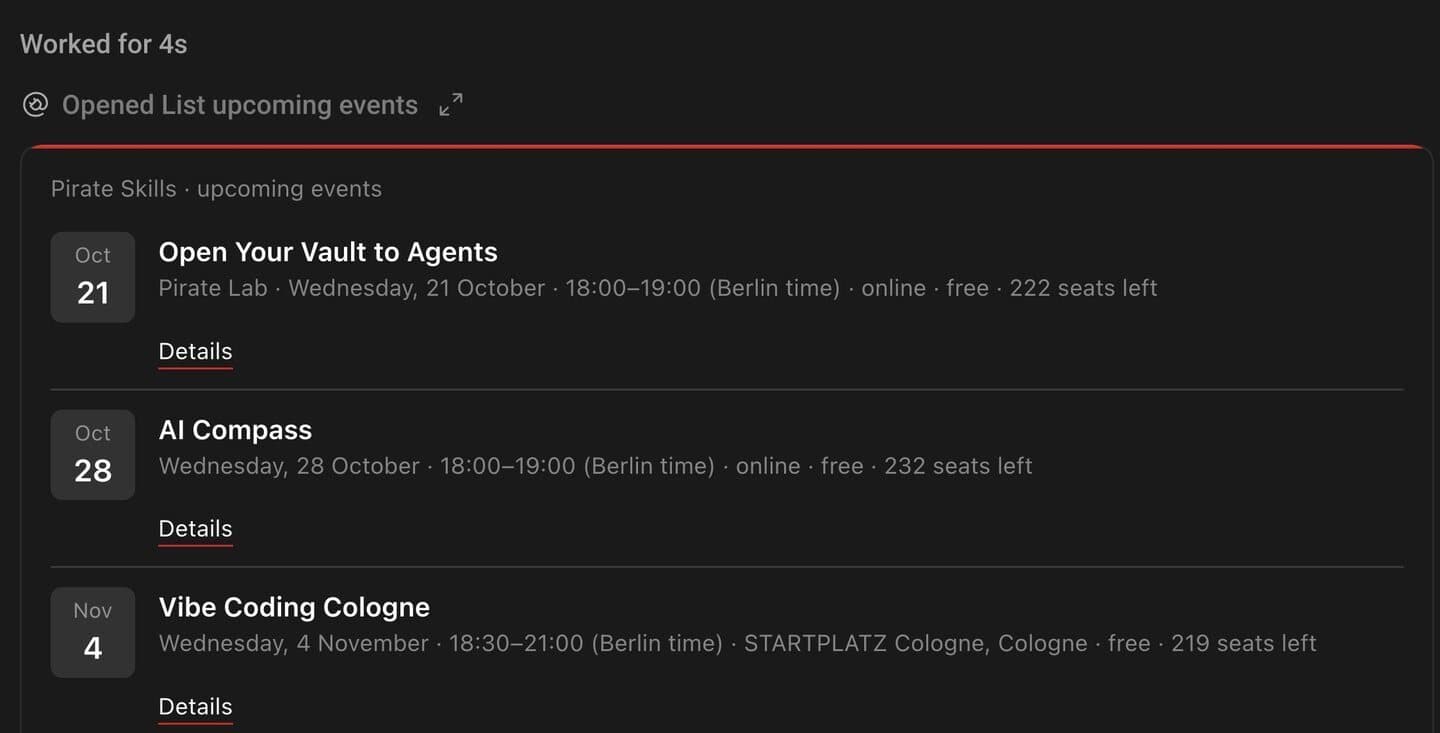
Same events, same seats, five different places. Your customers don’t have to come to you. Their agent brings you to them.
And in every one of them, the same rule: looking things up works for anyone, but anything that changes something needs you to sign in, and then the agent asks before it acts. When an agent buys something for you, it only prepares the checkout. You pay yourself, on Stripe’s page.
What Makes
It Work
Behind all five demos are three parts. I think of them as a vault, its doors and the signs that lead to it.
- 1
One vault
Every valuable thing you offer, built once.
Ours: Find events, register, search the knowledge, start a checkout.
- 2
Doors
A way in for each kind of agent.
Ours: Claude and ChatGPT, a key for automations, tools in the page.
- 3
Signs
What an agent reads before it recommends you.
Ours: “When to use us”, prices as data, docs in plain text.
1. One vault
The vault represents the value that you have to provide, and there are many ways to get that value.
On most vibe-coded sites, the website is the vault. The code behind a button checks your browser’s login, then does the job. An agent has no browser, so the same code turns it away. The fix is to build each valuable action once, as one function that is told who is asking. The button on your site still works; it just calls that function now. I explained this step by step in Open Your Vault to Agents.
2. Doors
Once the vault exists, every way in is thin. Claude and ChatGPT use a connector: an address people paste into their assistant once. Ours is pirateskills.com/mcp, and the set-up steps for every assistant are on our agents page. The cards are a newer standard on top of it, called MCP Apps.
For agents that run on a server with nobody watching, there’s a key you create in your account, and the command-line tool. Why both?
I personally am annoyed that these types of connections rarely hold.
A sign-in popup needs a person to click it. A key keeps working. And for agents inside the browser, Chrome is testing a way for a page to hand its tools straight to them. Hardly any agent uses that yet, but it was cheap to add, so pirateskills.com takes part in the trial.
3. Signs
This is the part most people skip, because it doesn’t look like a feature. Before an agent recommends you, it reads about you: a short “When to use us” text in a file called llms.txt, your facts and prices in a format machines read, your docs as plain text, and a skill that explains your tools. Ours took one morning. The “When to use us” text took ten minutes, and it’s probably the change that matters most to a real agent.
The signs also decide what a stranger gets. Without an account, an agent finds our Codex chapters and links them. Signed in, it can read what they say. If the technical side is new to you, the Builder Codex chapter on an MCP server is the gentle start.
Check It From
the Outside
By mid-September we had the vault and the doors. Then I ran a free outside check on pirateskills.com, and it gave us 50 out of 100. The doors were there. The signs were missing. One Sunday of putting them up took us to 91.
is-agentic.com
50 → 91
Out of 100, grade A
Cloudflare’s scanner
1 → 5
From “Basic Web Presence” to “Agent-Native”
Three things I learned on the way:
A scanner is someone else’s checklist
Cloudflare’s scanner, same site, same evening, said Level 1 of 5. Most of the gap was format, and two hours later we were at Level 5. But some boxes simply don’t fit you. A growth-marketing academy has no business taking crypto payments from agents. So sort the list into three piles: a real gap, doesn’t fit you, needs your decision. Then fix only the first pile.
No scanner sees what a person sees
The worst bug of the day had nothing to do with the score. Setting up ChatGPT on my own Mac, the connection stayed “not logged in.” Anyone already signed in to our site was sent to the homepage instead of the “Allow access” page. It had never worked, and nobody noticed for a month, because Claude takes another route. One wrong redirect, fixed the same day. Test the way a real person arrives.
Have someone attack your doors
A separate session reviewed every door the same day. Nothing critical, nothing high. The one medium finding was fixed the same day too.
Your First
Hour
You don’t need everything above. Start where we would start again:
- 1
Scan your site
Paste your address into is-agentic.com. Read the list behind the number, not just the number.
- 2
Write the signs
What you are, who you're for, when an agent should recommend you, and your prices.
- 3
Put one action in the vault
The one thing people come to you for most, built once and told who is asking.
- 4
Open one door
For Claude and ChatGPT if your customers live there, a key if they automate.
- 5
Try it as a stranger
Connect your own assistant, signed in and signed out, and ask for that thing in plain words.
The scan is free and needs no account: is-agentic.com. Then hand your coding agent the result and this prompt. It won’t change anything until you’ve talked it through:
I want AI agents – Claude, ChatGPT, or an agent someone runs on a server – to be able to find my website, understand what I offer and use it for the people who send them. I'm not a developer, so explain every step in plain words.

Before you change anything:

1. Read what this project is, who it is for and what people come to it for. Ask me to confirm the three most valuable things people do here (for example: book something, sign up, read the docs, buy).
2. I'll paste the result of an agent-readiness scan (from is-agentic.com). Sort every failing check into three groups: a real gap for us, doesn't fit our business, needs my decision. Explain each in one sentence.
3. Start with the signs: draft an llms.txt for this site with a short "When to use us" section, and structured data for who we are and what we sell, with prices. Show me both before you add them.
4. For the first of the three valuable things, find where it happens in the code today and tell me whether that code checks the login itself or is told who the user is. Propose how to move it into one server-only function that is told who is asking, with the existing button still calling it. Don't write it yet.
5. Propose ONE door to open first – an MCP server with sign-in, or API keys – and explain the trade-off for my users.

Ask me your questions one at a time, and wait for my answers before moving on.Ready is not used
One honest number to end on. Since our doors opened in September, agents from outside made 116 tool calls. As far as we can tell, every one of them was us, testing. What people actually use is the Captain, the assistant on our own site.
Being agent-ready is the doorway, not the traffic. People still have to connect. That’s what the directories are for: our listing in Claude’s directory is in review, and ChatGPT’s waits for OpenAI to verify the company. Until then, connecting takes one address, and the steps are on our agents page.
We’ll go through all of it live, with your questions, in the Pirate Lab on Wednesday.
Agents are becoming the go-between for us and the people we serve. The easier we make it for them, the easier it is for people to get the value. Build the vault once, open a door, and put up the signs.
Cheers,
Ben
Ready to Go Deeper?
Don't miss the next Insight
Join the crew and get fresh perspectives delivered weekly.
Free account. No spam. Unsubscribe anytime.
Questions & Answers
What does agent-ready mean?
How do I try it with Pirate Skills?
Does it cost anything?
Can an agent spend my money?
Why build a key and a command-line tool when there is MCP?
How do I check my own website?
Should I fix everything the scanner lists?
Will agents bring me customers right away?

Founder from Cologne with 15 years of startup experience across 9 ventures. After helping thousands master growth marketing, Ben learned vibe coding from scratch and launched CaptAIn within three months. He leads the Vibe Coding Cologne community, blending real founder experience with teaching clarity.