Bring Pirate Skills into your AI assistant
Ask about events, passes and growth questions where you already chat. They come back as cards you can act on – and once you sign in, it registers you or books a call with Ben, always after asking you first.
Works with Claude, ChatGPT, Claude Code, Cursor, Codex – and agents inside Chrome.
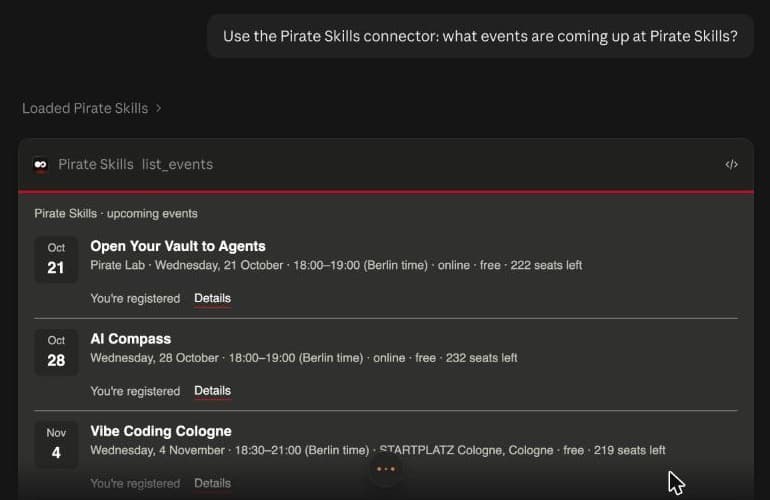
Right in your chat
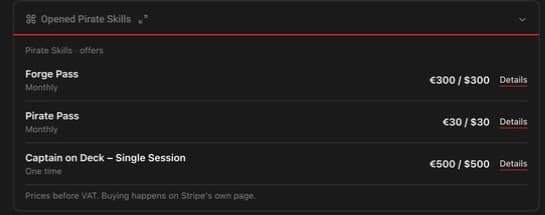
Events and prices arrive as cards, not walls of text. Register for a free event with one click – the card asks you to sign in first, and nothing happens without your click.
Set up in two steps
Pick your assistant and follow along.
Which assistant do you use?
Connect it
Lets Claude look things up on Pirate Skills and show the cards. Works without an account.
In Claude.ai or Claude Desktop, open Customize → Connectors, click + and choose Add custom connector.
Paste this address and click Add:
https://pirateskills.com/mcpIn a chat, open the + menu → Connectors, switch Pirate Skills on and ask what's on at Pirate Skills.
Works on every Claude plan – on Free it's your one custom connector. On Team and Enterprise, an owner adds it once in Organization settings → Connectors, then everyone clicks Connect.
Sign in
Only when you want it to do things for you – register, book, check your wallet.
In Customize → Connectors, click Connect next to Pirate Skills.
On the Pirate Skills page, check it names Claude, then click Allow.
Back in Claude it shows as connected. Each thing it does for you costs 1 gold.
Teach it the skill
A short guide that tells your assistant how to use Pirate Skills well – where to look, and to ask you before it does anything.
Download the Pirate Skills skill. It's one small file, zipped – no need to open it.
Download pirateskills.zipIn Claude, open Customize → Skills, click + and choose Create skill → Upload a skill.
Pick the file you just downloaded and switch the skill on.
Skills need Code execution and file creation switched on in Settings → Capabilities. On Enterprise, an owner turns skills on first.
Connect it
Lets ChatGPT look things up on Pirate Skills and show the cards. Works without an account.
In the ChatGPT app, open Settings → Plugins → MCPs, then Add → Add MCP server.
Name it pirateskills, choose Streamable HTTP, paste the address and save:
https://pirateskills.com/mcpStart a chat in Work and ask what's on at Pirate Skills.
On chatgpt.com in the browser, turn on Developer mode first, in Settings → Security and login. It needs a paid plan, and on a work account your admin may have to allow it.
Sign in
Only when you want it to do things for you – register, book, check your wallet.
Next to pirateskills, click Authenticate.
On the Pirate Skills page, check it names ChatGPT, then click Allow.
Back in ChatGPT it shows as signed in. Each thing it does for you costs 1 gold.
Connect it
Lets Claude Code look things up on Pirate Skills and show the cards. Works without an account.
Run this in your terminal:
claude mcp add --transport http --scope user pirateskills https://pirateskills.com/mcpStart Claude Code and ask what's on at Pirate Skills.
--scope user makes it work in every folder. Leave it out to add Pirate Skills to this project only.
Sign in
Only when you want it to do things for you – register, book, check your wallet.
In Claude Code, type /mcp, pick pirateskills and choose Authenticate.
On the Pirate Skills page, check it names Claude Code, then click Allow.
Back in the terminal it shows as connected. Each thing it does for you costs 1 gold.
Teach it the skill
A short guide that tells your assistant how to use Pirate Skills well – where to look, and to ask you before it does anything.
Run this in your terminal. When it asks which apps should learn the skill, pick Claude Code.
npx skills add https://pirateskills.com/skills/pirateskills/SKILL.md
Needs Node.js. Run it again any time to get the newest version.
Connect it
Lets Cursor look things up on Pirate Skills and show the cards. Works without an account.
Click the button, then confirm the install in Cursor.
Add to CursorNo button? Open the Customize page in Cursor's sidebar, add an MCP server called pirateskills and give it this address:
https://pirateskills.com/mcp
Sign in
Only when you want it to do things for you – register, book, check your wallet.
When Cursor asks, sign in with your Pirate Skills account.
On the Pirate Skills page, check it names Cursor, then click Allow.
Back in Cursor it shows as connected. Each thing it does for you costs 1 gold.
Teach it the skill
A short guide that tells your assistant how to use Pirate Skills well – where to look, and to ask you before it does anything.
Run this in your terminal. When it asks which apps should learn the skill, pick Cursor.
npx skills add https://pirateskills.com/skills/pirateskills/SKILL.md
Needs Node.js. Run it again any time to get the newest version.
Connect it
Lets Codex look things up on Pirate Skills and show the cards. Works without an account.
Run this in your terminal:
codex mcp add pirateskills --url https://pirateskills.com/mcp
One setup covers Codex in the terminal, the editor extension and the desktop app.
Sign in
Only when you want it to do things for you – register, book, check your wallet.
Run this in your terminal:
codex mcp login pirateskillsOn the Pirate Skills page, check it names Codex, then click Allow.
Back in the terminal it shows as signed in. Each thing it does for you costs 1 gold.
Teach it the skill
A short guide that tells your assistant how to use Pirate Skills well – where to look, and to ask you before it does anything.
Run this in your terminal. When it asks which apps should learn the skill, pick Codex.
npx skills add https://pirateskills.com/skills/pirateskills/SKILL.md
Needs Node.js. Run it again any time to get the newest version.
Another app? If it can add an MCP server by address, use https://pirateskills.com/mcp – or https://pirateskills.com/mcp/docs to search the guides and see the events without signing in.
What you can ask
Click one to copy it, then paste it into your assistant.
Built into the page, too
An agent working inside Chrome doesn't have to click around. Every Pirate Skills page hands it three tools directly – search the Codex, list the events, see the offers. Read-only, never as you.
How it worksWhat a browser agent sees on pirateskills.com
search_knowledgethe Codex and Insightslist_eventsupcoming eventsget_offerspasses and prices
Safe by design
It asks first
Before it registers you or books anything, it says what it's about to do and waits for your yes.
It never pays for you
A checkout is a link you open and finish yourself. Your assistant can't spend your money.
Disconnect any time
Remove it where you added it. It sees only your own account, never anyone else's.
Signed in, everything it does for you costs 1 gold. You see every step in your wallet. Trying it without an account is free.
What gold is forBuild with it
The same tools for your own code and agents – four doors, one set of rules.
For agents and AI apps. Cards in Claude and ChatGPT; a public door without sign-in for lookups.
pirateskills.com/mcpEvery tool as plain HTTP, described in OpenAPI. Versioned, safe to retry.
/openapi.jsonEvents, offers, your wallet and every tool from the terminal.
npm install -g pirateskillsThe public tools inside every page, for agents in Chrome.
document.modelContextOn npm: pirateskills 1.0.1 · MIT In the official MCP registry: com.pirateskills/pirateskills