
How we Measure
Ensure that you can track each important metric
1. Goal - Setting up tracking systems
What You've Already Built
In the What we Measure lesson, you defined the metrics that matter for your customer journey–specific, actionable metrics for each funnel stage (ToFu, MoFu, BoFu, GroFu). Now it's time to set up systems that actually capture this data so you can measure what's happening.
What You're Deciding Here
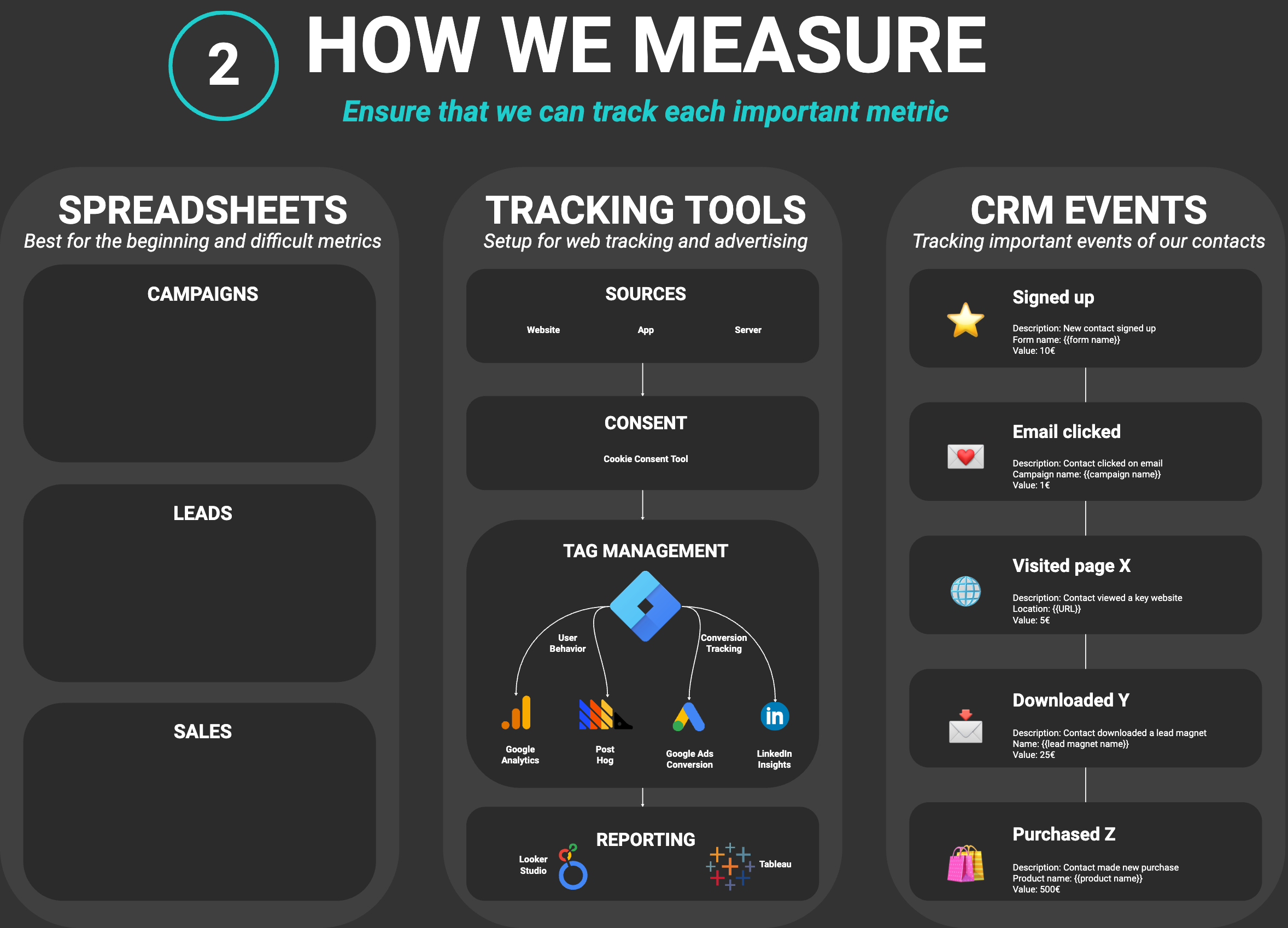
This lesson helps you make a critical strategic decision: Which tracking approach should you use? There are four main approaches, each with different strengths:
Spreadsheets (Manual Tracking)
Best for: Getting started quickly, tracking difficult metrics, small businesses, metrics that don't auto-track. Simple, flexible, and you control everything. Perfect when you need to track things like "calls booked" or "partnerships formed" that don't automatically flow into tools.
Tracking Tools (Automated Web Tracking)
Best for: Website metrics, ad performance, content engagement, scale. Tools like Google Analytics automatically capture visitor behavior, page views, conversions, and more. Set it up once, and it tracks continuously.
CRM Events (Customer Journey Tracking)
Best for: Tracking the complete customer journey, connecting marketing to sales, understanding lead quality. Your CRM becomes the single source of truth, tracking every interaction from first touchpoint to loyal customer.
Product Database (Direct Database Tracking)
Best for: Developers and vibe coders who want to work with the ultimate source of truth–user activity in your product database. No external systems needed. Track user behavior, feature usage, conversions, and product metrics directly where your data lives. Perfect when you want full control and don't want to depend on external tracking tools.
What Should You Focus On First?
Your starting point depends on your current situation:
If You're Just Getting Started
Start with spreadsheets. They're free, flexible, and help you understand what metrics matter before investing in tools. Track your most important 5-7 metrics manually for 1-2 months. Once you see the value, add automated tracking.
If You Have a Website and Run Ads
Add tracking tools (Google Analytics, Meta Pixel, etc.) immediately. These capture data automatically and give you insights you can't get manually. Set up basic tracking first, then add more advanced features.
If You Have a CRM
Set up CRM events to track your complete customer journey. Connect your marketing touchpoints (website, emails, ads) to your CRM so you can see how leads move through your funnel. This is especially powerful for high-touch funnels.
Most Businesses Use Multiple Approaches
Use spreadsheets for metrics that don't auto-track, tracking tools for website/ad data, CRM events for the complete customer journey, and product database tracking for user behavior in your product. They work together to give you a complete picture.
Your Decision
By the end of this lesson, you'll have set up the right tracking approach for your business–whether that's simple spreadsheets to get started, automated tools for scale, or CRM integration for comprehensive tracking.
2. Spreadsheets - Manual tracking with spreadsheets
Spreadsheets are your foundation for tracking metrics that don't automatically flow into tools. They're perfect for getting started, tracking difficult metrics, and maintaining flexibility as your needs evolve.
Why Spreadsheets Matter
Flexibility: Track anything–metrics that don't have automated solutions, custom calculations, business-specific KPIs. You're not limited by what tools can track automatically.
Understanding: Manual tracking forces you to understand your metrics. You see the data entry process, notice patterns, and develop intuition about what numbers mean.
Cost-Effective: Free (Google Sheets) or low-cost (Excel), no subscriptions, no setup complexity. Perfect for bootstrapped businesses.
When to Use Spreadsheets
- Getting started: Track your first 5-7 key metrics manually to understand what matters
- Difficult metrics: Track things like "calls booked," "partnerships formed," "content pieces published" that don't auto-track
- Custom calculations: Create your own formulas and dashboards
- Small scale: When you don't have enough volume to justify tool setup
Essential Spreadsheet Structure
Create a simple tracking sheet with:
- Date column: Track metrics over time
- Metric columns: One column per metric (visitors, leads, customers, revenue, etc.)
- Source columns: Where did this come from? (organic, ads, referrals, etc.)
- Notes column: Context for unusual numbers or changes
Best Practices
- Update regularly: Daily or weekly, not monthly (too hard to remember)
- Keep it simple: Start with 5-7 metrics, add more as needed
- Use formulas: Calculate rates, percentages, and trends automatically
- Visualize: Create simple charts to see trends over time
Outcome: You have a spreadsheet tracking system set up with the right structure for your metrics.
3. Tracking Tools - Automated tracking tools
Tracking tools automatically capture data from your website, ads, and online activities. Once set up, they track continuously without manual work–giving you insights you can't get from spreadsheets alone.
Why Tracking Tools Matter
Automation: Set it up once, track forever. No manual data entry, no forgetting to update. Data flows automatically from your website, ads, and tools.
Scale: Handle thousands of visitors, millions of data points. Spreadsheets can't scale to this level, but tracking tools are built for it.
Insights: See behavior patterns, conversion paths, audience segments. Tools analyze data and reveal insights you'd never notice manually.
When to Use Tracking Tools
- You have a website: Track visitor behavior, page views, conversions automatically
- You run ads: Track ad performance, costs, conversions, ROI
- You publish content: Track content performance, engagement, traffic sources
- You want scale: Handle high volume without manual work
Essential Tracking Tools
Google Analytics (Free)
Tracks: Website visitors, page views, traffic sources, conversions, user behavior. Essential for any website. Set up basic tracking first, then add goals and events.
Meta Pixel (Free)
Tracks: Facebook/Instagram ad performance, website conversions from ads, audience behavior. Essential if you run Facebook/Instagram ads.
Google Tag Manager (Free)
Manages: All your tracking codes in one place. Makes it easy to add/update tracking without touching website code. Use this to manage Google Analytics, Meta Pixel, and other tools.
Other Tools (As Needed)
- Hotjar/Microsoft Clarity: See how visitors use your site (heatmaps, recordings)
- Search Console: Track search performance and SEO
- Email platform analytics: Track email performance (opens, clicks, conversions)
Best Practices
- Start simple: Set up Google Analytics first, add more tools as needed
- Set up goals: Define what "conversion" means (form submissions, purchases, etc.)
- Use Tag Manager: Manage all tracking codes in one place
- Review regularly: Check data weekly, but don't obsess over daily fluctuations
Outcome: You have automated tracking tools set up that capture data from your website and marketing activities.
4. CRM Events - Tracking in CRM
Your CRM becomes the single source of truth for your complete customer journey. By tracking events in your CRM, you can see how leads move through your funnel from first touchpoint to loyal customer–connecting marketing activities to sales outcomes.
Why CRM Events Matter
Complete Journey: Track the entire customer journey in one place–from first website visit to purchase to renewal. See how marketing activities connect to sales results.
Lead Quality: Understand which marketing activities generate the best leads. See which sources, campaigns, and content produce customers (not just leads).
Sales Integration: Connect marketing metrics to sales outcomes. See conversion rates, sales cycle length, deal sizes–the metrics that matter for revenue.
When to Use CRM Events
- You have a CRM: Essential if you use a CRM (HubSpot, Salesforce, Pipedrive, etc.)
- High-touch funnel: Critical for sales-assisted funnels where leads become opportunities
- Multi-touch journey: Track complex journeys with multiple touchpoints
- Team collaboration: Share data across marketing and sales teams
Essential CRM Event Tracking
Marketing Events:
- Website visits, page views, content downloads
- Email opens, clicks, engagement
- Ad clicks, form submissions, lead magnet downloads
- Social media engagement, webinar attendance
Sales Events:
- Lead created, qualified, assigned
- Demo scheduled, completed
- Proposal sent, deal won/lost
- Customer onboarded, upsold, renewed
Customer Events:
- Purchase completed, subscription started
- Feature usage, support tickets
- Upsell opportunities, renewal dates
- Referrals, reviews, advocacy
Best Practices
- Connect everything: Link website, email, ads, and sales activities to CRM
- Use automation: Set up workflows to track events automatically
- Track sources: Always capture where leads come from (source, campaign, content)
- Update regularly: Keep CRM data current so metrics are accurate
Outcome: You have CRM event tracking set up that captures your complete customer journey from marketing to sales to customer success.
5. Product Database - Tracking directly in your product database
For developers and vibe coders, your product database is the ultimate source of truth. Instead of relying on external tracking tools, you can track user behavior, feature usage, conversions, and product metrics directly where your data lives.
Why Product Database Tracking Matters
Single Source of Truth: Your product database already contains user activity, feature usage, conversions, and behavior. No need to sync data between external tools–it's all in one place.
Full Control: You control the schema, queries, and analysis. No limitations from external tool APIs or data export restrictions.
Developer-Friendly: If you're building the product, you can instrument tracking directly in your code. Track exactly what matters without relying on third-party tools. Use Claude Code in the Claude Desktop app to add the tracking to your codebase and write the queries for you.
Cost-Effective: No per-user pricing or API limits. Your database is your tracking system.
When to Use Product Database Tracking
- You're a developer/vibe coder: You're comfortable working with databases and SQL
- You want full control: You don't want to depend on external tracking tools
- You have a product with user activity: Users log in, use features, convert–all tracked in your database
- You want to track product usage: Feature adoption, user engagement, product metrics
What You Can Track
User Activity:
- User signups, logins, sessions
- Feature usage and adoption
- User engagement and activity patterns
- Product-specific events (actions, conversions, milestones)
Product Metrics:
- Feature usage rates
- User retention and churn (based on activity)
- Conversion funnels (signup → activation → conversion)
- Product engagement scores
Business Metrics:
- User-to-customer conversion rates
- Feature-to-revenue connections
- Product usage patterns that predict churn
- Expansion opportunities based on usage
Best Practices
- Instrument key events: Track the actions that matter (signups, feature usage, conversions)
- Use event tables: Create event logs for user actions, not just user records
- Query regularly: Set up queries or views for common metrics
- Document your schema: Keep track of what you're tracking and why
Outcome: You have product database tracking set up that captures user activity and product metrics directly in your database.
6. Your Tracking Setup Overview
Creating Your Tracking Setup Overview
Throughout this lesson, you've set up tracking systems: spreadsheets for manual tracking, automated tools for website/ad data, CRM events for the complete customer journey, and product database tracking for user behavior in your product. Now it's time to create a single overview document that shows all your tracking systems and how they work.
The Goal: Complete Overview of All Your Tracking Systems
This tracking setup overview will serve as your reference for:
- Remembering how each tracking system works
- Onboarding team members to your tracking setup
- Troubleshooting tracking issues
- Adding new metrics or tools in the future
Having all your tracking configurations in one place means you can quickly reference setup steps, tool configurations, and measurement methods–without searching through multiple conversations or documents.
Outcome: You have a complete tracking setup overview that shows all your tracking systems and how they work together.